Sponsored

Backup Camera Guidelines missing

TONTO

Active Member
First Name
Matt
Joined
Dec 10, 2020
Threads
5
Messages
37
Reaction score
99
Location
Texas - Gig Em!! ?
Vehicle(s)
2020 Ford Ranger XLT Sport
Vehicle Showcase
1
The active and fixed guidelines are missing when I have my truck in reverse on my 2020 XLT Ranger. It shows the fixed figure of the truck in the top right hand corner but no guidelines. I went into the settings/vehicle/camera and toggled off and on the parking aids button where it shows the lines in the preview but the lines still don't come on. I would appreciate if anyone has any insight on how to fix this. Thanks.
Sponsored

 

cfhgarza

Well-Known Member
Joined
Jul 30, 2020
Threads
21
Messages
641
Reaction score
1,287
Location
Ohio
Vehicle(s)
2020 Magnetic XLT 301A
Occupation
Press and weld set-up
Try disconnecting the battery for 5 minutes or so. Could also try a master reset
 

Kulie74

Member
First Name
Eric
Joined
Oct 27, 2020
Threads
1
Messages
10
Reaction score
2
Location
Florida
Vehicle(s)
2000 Silverado, 2020 Ranger FX4
Occupation
Retired
I was looking to get my 2020 activated (again)so I could get the remote start operating, had a problem, have tried the master reboot and disconnecting the battery. No luck yet but I did loose the backup guides that move with the turn…. I think the truck is as confused as I am right now.
 

amart313

New Member
First Name
Agustin
Joined
Dec 7, 2022
Threads
0
Messages
1
Reaction score
0
Location
California
Vehicle(s)
2022 Ford Ranger XLT
Recently, I unplugged my battery for approximately 3 days as I was leaving for a trip out of town. When I came back, I reattached the negative battery terminal, secured it down properly and put the car reverse and active guidelines was gone. Under vehicle settings, there is no menu for active guidelines. Even in the camera menu. Has anyone else had this issue? If so, what is the fix?
P.S
Vehicle has not had any work done. I do not tow with the vehicle, and the lines worked perfectly fine up to the day that I unplugged the battery. My vehicle is a 2022 Ford ranger XLT 2 WD with 15,000 miles. * apologies for the poor video quality. Hope the message gets through.


dapakattack

Well-Known Member
First Name
Daniel
Joined
Dec 30, 2020
Threads
5
Messages
398
Reaction score
1,642
Location
North Texas
Vehicle(s)
2020 Ranger XLT 4x4
Hi Agustin,

I believe if you just drive the truck for a few miles and then restart it, the next time you go in reverse the guide lines will come back. Something similar happened when I disconnected my battery for a short time.....reversing out of the drive way - noticed no guide lines on the display - thought I screwed something up - drove a bit - and noticed they were there the next time I was backing out of a spot.


brendankelly

Member
First Name
brendan
Joined
Jul 15, 2020
Threads
3
Messages
17
Reaction score
73
Location
Baltimore
Vehicle(s)
2019 Ranger
Vehicle Showcase
1
If I am not mistaken there is an option in Settings that can toggle the lines on or off. Maybe check that and see if anything changes
 

Sixox74

Member
First Name
Simon
Joined
Nov 26, 2024
Threads
1
Messages
6
Reaction score
2
Location
Gold Coast
Vehicle(s)
My18 XLT Ranger
Occupation
Engineer
My active guides went missing also while under warranty, dealer couldn't find any issues, They have now told me my model did not come out with the active guides yet I have been using them for 5yrs now.
 

airline tech

Well-Known Member
Joined
Aug 24, 2022
Threads
28
Messages
4,448
Reaction score
8,507
Location
Midwest - KS
Vehicle(s)
2022 Ranger Lariat-Super Crew, Cactus Gray
Occupation
Aircraft Tech
My active guides went missing also while under warranty, dealer couldn't find any issues, They have now told me my model did not come out with the active guides, yet I have been using them for 5yrs now.
If you have a Scanner or Forscan:
Perform a New Module Lin Initialization on the Rear Camera, I suspect the gridlines will return.

Also, do you have the Rear Camera settings (options) screen showing on the Sync screen?

Does it show Camera Delay and Camera Zoom Options?
You may try toggling those settings.

Basically, the New Initialization should reestablish communication between the BCM & Rear Camera for the Lin circuit.
 
Last edited:

Sixox74

Member
First Name
Simon
Joined
Nov 26, 2024
Threads
1
Messages
6
Reaction score
2
Location
Gold Coast
Vehicle(s)
My18 XLT Ranger
Occupation
Engineer
Hey thanks for this very much appreciated. I sent it over to Ford and they said they have tried it but with no luck. I think they are all just board jockeys there replacing parts to see what works rather than critical thinkers who diagnose. Any way ill keep trying myself when I pick up.
 

airline tech

Well-Known Member
Joined
Aug 24, 2022
Threads
28
Messages
4,448
Reaction score
8,507
Location
Midwest - KS
Vehicle(s)
2022 Ranger Lariat-Super Crew, Cactus Gray
Occupation
Aircraft Tech
Try to get specific information on what they tried and failed to get it working.
Such as did they replace the camera?
 

Sixox74

Member
First Name
Simon
Joined
Nov 26, 2024
Threads
1
Messages
6
Reaction score
2
Location
Gold Coast
Vehicle(s)
My18 XLT Ranger
Occupation
Engineer
Yes they replaced the camera on one of the first visits, plugged it in and done the reboot but still nothing unfortunately.
 

RangerBill

Well-Known Member
First Name
Bob
Joined
Jun 8, 2022
Threads
3
Messages
1,601
Reaction score
2,125
Location
PA
Vehicle(s)
2019 Ford Ranger Lariat Super Crew FX4
Occupation
retired
Yes they replaced the camera on one of the first visits, plugged it in and done the reboot but still nothing unfortunately.
Have you checked for any DTCs?
 

airline tech

Well-Known Member
Joined
Aug 24, 2022
Threads
28
Messages
4,448
Reaction score
8,507
Location
Midwest - KS
Vehicle(s)
2022 Ranger Lariat-Super Crew, Cactus Gray
Occupation
Aircraft Tech
Did you tow anything or tap into the trailer lighting circuit for extra lighting? around the time the grid lines disappeared.
If the truck sees or thinks a trailer is connected, the grid lines will not display so check the trailer plug and harness at the bumper.

The Grid Lines come from the camera and control of those lines comes from the information the BCM is receiving for steering angle input along the HS1-Can network and transmits this data via the LIN circuit back to the camera from the BCM.
So, you have a COM issues, as I suspect that if you lost Steering Angle Input, you would have codes generated for other modules, such as ABS.


If the dealer is washing their hands of this, I would scan for codes and:

Pull Fuse #23 in the BJB (Engine Bay) for 5-Minutes
If no help:
1. Perform BCM - Self Test
2. SCCM - Self Test
3. APIMP - Self Test
4. New LIN Module Initialization

Live Data:
Look at the Steering Angle (PID's)
Reverse Input (PID's)
If these PID's are normal, then it's a COM issue between the BCM & Rear Camera or internal BCM itself.
From here its wiring checks and or pull & reseat connectors between the BCM & Camera as the LIN circuit is dead between them.
There are 4 total connectors that can be producing the issue for the LIN circuit, if that LIN circuit checks good then you need to look at possibly disconnecting the trailer harness as that circuit may be causing the issue.
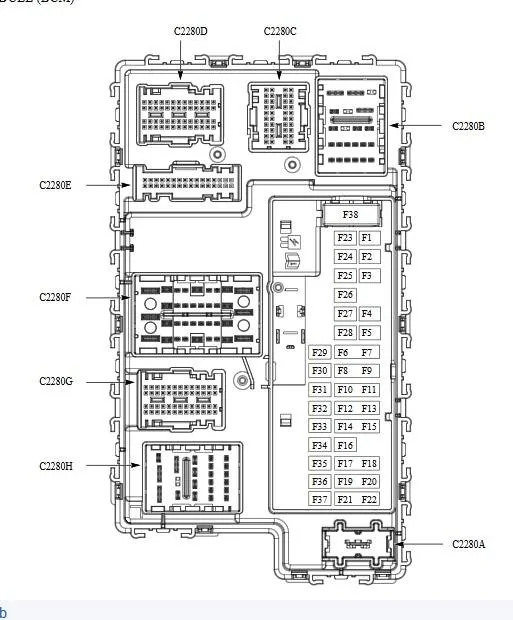
BCM: C2280D
Inline: C1147 - Drivers Side Footwell
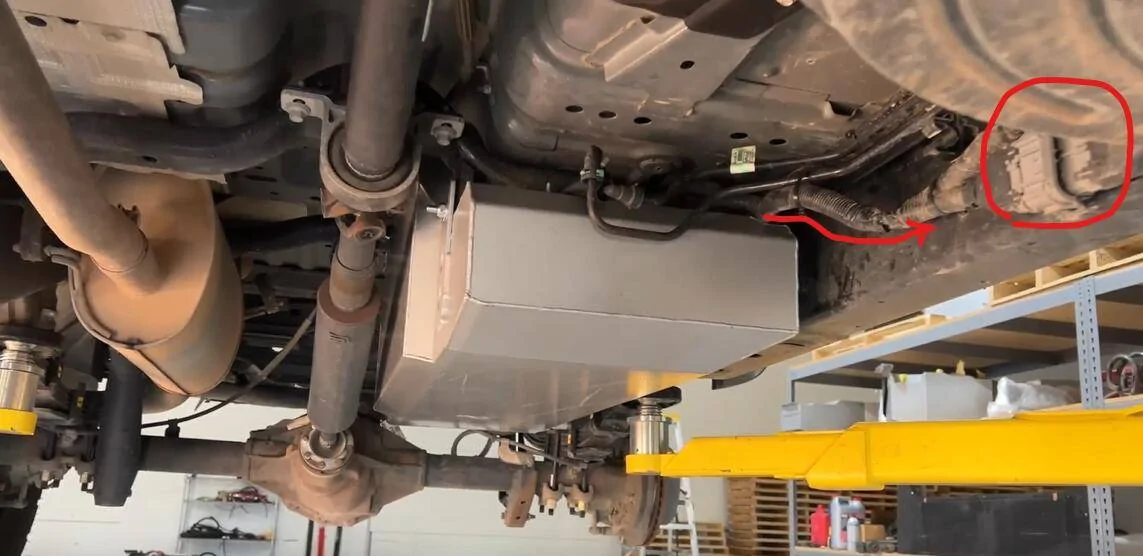
Inline: C408 - Along the Left Frame (Most -Aft Connector) this will be the most likely connector
Rear Camera Connector:
 

airline tech

Well-Known Member
Joined
Aug 24, 2022
Threads
28
Messages
4,448
Reaction score
8,507
Location
Midwest - KS
Vehicle(s)
2022 Ranger Lariat-Super Crew, Cactus Gray
Occupation
Aircraft Tech
Cannot find a clear pic of C1147 location but here is C408, this connector has been problematic for various issues.

C408 Location.webp


Here is the BCM connector diagram location:

BCM Fuse Panel.webp


C1147 will be located in the left footwell area, it will be a big connector (59 Cavity)
 

RangerBill

Well-Known Member
First Name
Bob
Joined
Jun 8, 2022
Threads
3
Messages
1,601
Reaction score
2,125
Location
PA
Vehicle(s)
2019 Ford Ranger Lariat Super Crew FX4
Occupation
retired
My active guides went missing also while under warranty, dealer couldn't find any issues, They have now told me my model did not come out with the active guides yet I have been using them for 5yrs now.
This is from the shop manual:


Active Guidelines


NOTE:
If the battery has been disconnected or discharged, or a module is disconnected or replaced, the active guidelines may be inoperative until the vehicle is driven on a flat and smooth road at 32 km/h (20 mph) or more, with hands placed loosely on the steering wheel and minimal steering correction for approximately 30 seconds.


If the guidelines remain inoperative, it may be necessary to disconnect the battery for 5 minutes with the driver's door open, then drive the vehicle for 5 miles in normal city driving before performing the procedure described above.


The active guidelines feature displays dynamic guidelines that correspond to the projected path of vehicle travel, based on the current steering angle. Several modules are involved in generating the steering angle data used to support the active guidelines. The PSCM monitors the steering angle sensor and sends the steering wheel angle sensor data to the ABS module via the HS-CAN2 . The ABS module uses this message from the PSCM to generate the steering angle message that is sent to the GWM on the HS-CAN2 . The GWM then sends the message to the BCM via the HS-CAN1 . The BCM sends the steering angle data to the rear parking aid camera via the LIN circuit. The camera uses this data to generate the active guidelines over the video image.


If the steering wheel is in the straight-ahead position, the active guidelines are not shown.


The guidelines are not shown when reverse is not selected (video delay active).


If the vehicle is equipped with a TRM , the active guidelines are not shown when a trailer is electrically connected to the vehicle.
Sponsored


Top