Sponsored

RESOLVED - Anyone ever seen this?

RedlandRanger

Moderator
First Name
Rob
Joined
Nov 14, 2018
Threads
42
Messages
5,111
Reaction score
11,105
Location
Oregon
Vehicle(s)
2019 Ford Ranger Lariat FX4, 1973 Mercury Capri
Vehicle Showcase
1
So I appear to have encountered a very strange problem. I have had a cigarette lighter adapter in the right hand socket in my truck for a few years now - it has worked perfectly for any passengers. Last weekend, my buddy and I went hiking and he went to plug his phone in and it didn't charge - we messed with it a bit and it was just dead. We plugged it into the left socket and it started working again. I took a look at it this morning and now it appears the LEFT socket is dead too!

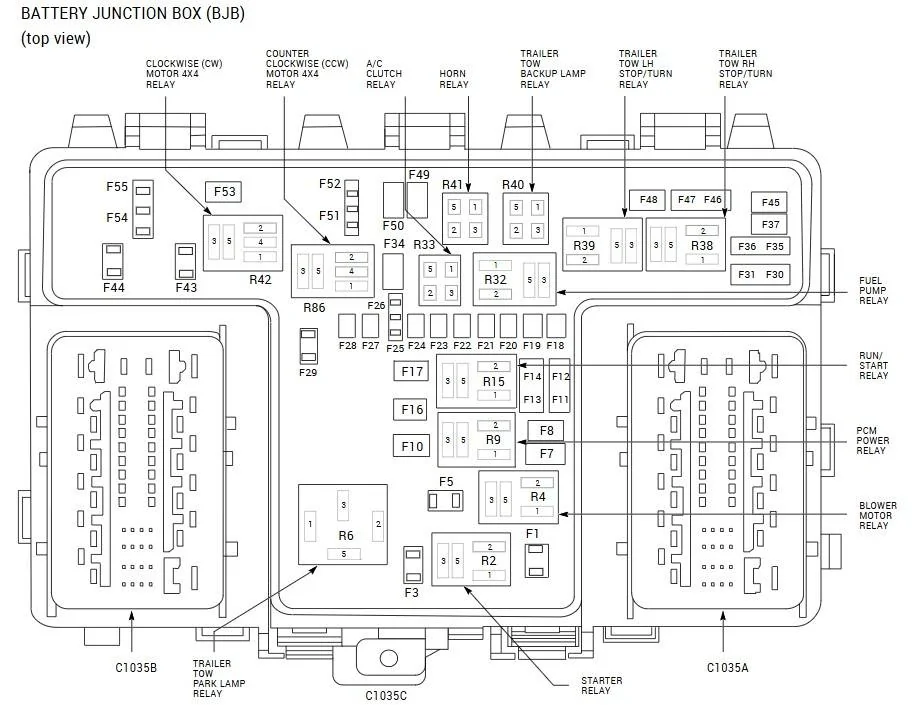
I've done nothing to the wiring at all - I have no idea what might have caused this. I looked at the fuse layout and although the descriptions for what the fuses are for are not clear in some cases, it kind of looked like maybe fuse 10 and 16 were for these sockets. I looked at the fuses and they seemed OK so I tested them with my multimeter - both fuses appear to be OK.

Anyone else know what might cause both of these sockets to die within a week of each other? I'm a bit perplexed. I did test the USB ports below and those work, as well as the USB ports in the back of the console.
Sponsored


 

Tom_C

Well-Known Member
First Name
Tom
Joined
Apr 17, 2021
Threads
35
Messages
1,972
Reaction score
4,389
Location
Virginia, USA
Vehicle(s)
2020 Ranger Lariat SuperCab FX4
Occupation
System Admin, Retired
Not with the 12v socket, but my USBs will sometimes stop working. I have an Ipod plugged in and sometimes it will just not work. If I turn it off and walk away so the fob is out of range, then come back it usually works. I just take it as being one of the sync3 things.
 

airline tech

Well-Known Member
Joined
Aug 24, 2022
Threads
28
Messages
4,456
Reaction score
8,517
Location
Midwest - KS
Vehicle(s)
2022 Ranger Lariat-Super Crew, Cactus Gray
Occupation
Aircraft Tech
You visually checked the fuses (10 & 16) but with Key (ON) is there power across them?

I suspect a short in the circuit - that the BCM is monitoring through the FET, and it is shutting off power supply.

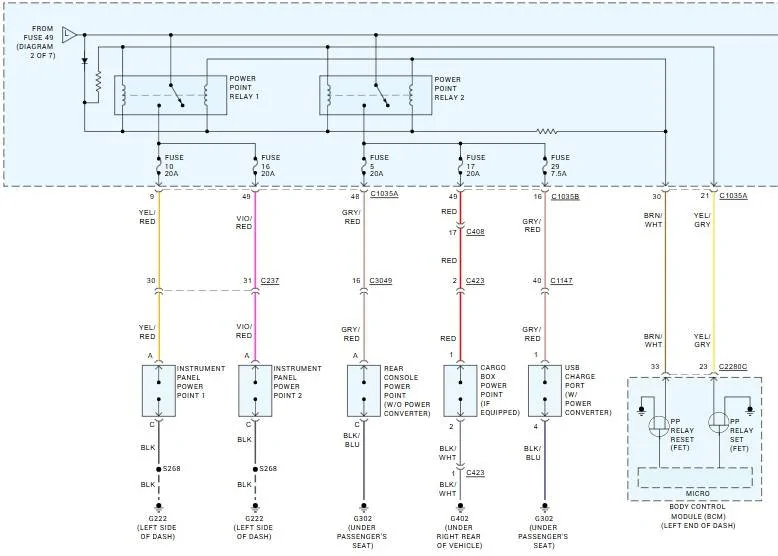
There are (2) Power Point Relays in the (BJB) - Engine Bay Fuse Box (They are integral and not serviceable)
Power Point Relay #1 - Feeds both Front - PowerPoints
After the Relay it is Fused - Fuse #10 - Power Point #1 (Left) - Fuse #16 - P/P #2 (Right)

Power Point Relay #2 - Feeds the Rear Power Point & USB Charge Port
After the Relay it is Fused - Fuse #5 - Rear Power Point & Fuse #29 - Rear USB Charge Port

The BCM - has an internal monitor (FET) Field Effect Transistor (That monitors output of BOTH circuits) (Both Power Point Relay) circuits.

If either circuit sensed a Short or (Power Issue) then it will drop (disable) power on either or both relay circuits.

So, I would (With Key-ON) check with a (Test Light or Meter) for power across all 4 fuses, if you do not have power on all (4) then with Forscan or Scan Tool - pull any codes and then do a BCM -Self Test) Reset - This will reset the (FET) if it has triggered, as long as it passes the (Self-Test)
Note: Remove the Adaptor - Before doing this

I suspect the issue is with the (Front-Right) Power Point - Or the (Adapter) - Leaving stuff plugged in to the Power Points - over time (with vibration / bumps) etc wears out the contacts and it will then fit loosely.
To test for that issue - after the BCM (Self-Test) - Plug the adapter in (and wiggle) it.
Does power drop on and off?
I would REPLACE the adapter anyways, as I suspect this is the most likely cause over the port itself.

Plus, note: Whatever that adapter is powering (if anything) can also be causing the issue, since it was not stated (is the adapter) just sitting in the port - waiting for a USB or it is a constant use for another power feed.

Side Note: The Front USB Ports are Powered via the APIM (Sync Module) they do not power from these relays.
 
OP
OP
RedlandRanger

RedlandRanger

Moderator
First Name
Rob
Joined
Nov 14, 2018
Threads
42
Messages
5,111
Reaction score
11,105
Location
Oregon
Vehicle(s)
2019 Ford Ranger Lariat FX4, 1973 Mercury Capri
Vehicle Showcase
1
You visually checked the fuses (10 & 16) but with Key (ON) is there power across them?

I suspect a short in the circuit - that the BCM is monitoring through the FET, and it is shutting off power supply.

There are (2) Power Point Relays in the (BJB) - Engine Bay Fuse Box (They are integral and not serviceable)
Power Point Relay #1 - Feeds both Front - PowerPoints
After the Relay it is Fused - Fuse #10 - Power Point #1 (Left) - Fuse #16 - P/P #2 (Right)

Power Point Relay #2 - Feeds the Rear Power Point & USB Charge Port
After the Relay it is Fused - Fuse #5 - Rear Power Point & Fuse #29 - Rear USB Charge Port

The BCM - has an internal monitor (FET) Field Effect Transistor (That monitors output of BOTH circuits) (Both Power Point Relay) circuits.

If either circuit sensed a Short or (Power Issue) then it will drop (disable) power on either or both relay circuits.

So, I would (With Key-ON) check with a (Test Light or Meter) for power across all 4 fuses, if you do not have power on all (4) then with Forscan or Scan Tool - pull any codes and then do a BCM -Self Test) Reset - This will reset the (FET) if it has triggered, as long as it passes the (Self-Test)
Note: Remove the Adaptor - Before doing this

I suspect the issue is with the (Front-Right) Power Point - Or the (Adapter) - Leaving stuff plugged in to the Power Points - over time (with vibration / bumps) etc wears out the contacts and it will then fit loosely.
To test for that issue - after the BCM (Self-Test) - Plug the adapter in (and wiggle) it.
Does power drop on and off?
I would REPLACE the adapter anyways, as I suspect this is the most likely cause over the port itself.

Plus, note: Whatever that adapter is powering (if anything) can also be causing the issue, since it was not stated (is the adapter) just sitting in the port - waiting for a USB or it is a constant use for another power feed.

Side Note: The Front USB Ports are Powered via the APIM (Sync Module) they do not power from these relays.
I was hoping you'd chime in on this one..... :)

I'm not sure how I can test for power ACROSS the fuse (those fuses don't have the little metal spot you can touch a test light/multimeter too - but I did confirm that there is power to one of the posts with the fuse out - so that circuit is definitely getting power.

Nothing other than the USB adapter was plugged into the port - the last time we went hiking it worked - last weekend it didn't - in the interim nothing else was plugged in - and the driver side port had NOTHING plugged into it at all until last weekend when I plugged in the adapter.

I will run FORScan to see if I get any codes and report back.


OP
OP
RedlandRanger

RedlandRanger

Moderator
First Name
Rob
Joined
Nov 14, 2018
Threads
42
Messages
5,111
Reaction score
11,105
Location
Oregon
Vehicle(s)
2019 Ford Ranger Lariat FX4, 1973 Mercury Capri
Vehicle Showcase
1
Are you sure it's not the adapter?
I tried another one and it did the same thing - I also tested it in my wife's car and it worked.
 
Last edited:
OP
OP
RedlandRanger

RedlandRanger

Moderator
First Name
Rob
Joined
Nov 14, 2018
Threads
42
Messages
5,111
Reaction score
11,105
Location
Oregon
Vehicle(s)
2019 Ford Ranger Lariat FX4, 1973 Mercury Capri
Vehicle Showcase
1
OK, so here is what I did:
  • Fired up FORScan - connected to truck
  • Did a BCM Reset (I didn't see the self test at first) - no change in behavior
  • Did a BCM Self Test - it found the following DTCs:
    • C1D00:11 - Parking Brake apply switch - circuit short to ground
    • B1438:11 - Autolamp On Input - circuit short to ground
    • B143C:11 - Headlamp off input - circuit short to ground
  • Did another BCM Reset - no change
  • Did another BCM Self test - same results
Those DTCs are odd since the light comes on when I apply the parking brake and both the auto headlamps and regular headlamps work fine, including the indicator in the dash.
 
OP
OP
RedlandRanger

RedlandRanger

Moderator
First Name
Rob
Joined
Nov 14, 2018
Threads
42
Messages
5,111
Reaction score
11,105
Location
Oregon
Vehicle(s)
2019 Ford Ranger Lariat FX4, 1973 Mercury Capri
Vehicle Showcase
1
F10 and F16 in the battery junction box (BJB) feed those two power points. Perhaps his phone charger is defective and causing the issue.
Well, my phone behaves the same as his did, and if I take the same adapter and same cable into my wife's car, it works as expected. Something goofy is going on....
 

TJC

Well-Known Member
First Name
Tony
Joined
Aug 28, 2020
Threads
45
Messages
3,938
Reaction score
9,886
Location
North Carolina
Vehicle(s)
93 Miata, 05 Ranger 4x4, 20 Ranger 4x4, 23 CX-5
You visually checked the fuses (10 & 16) but with Key (ON) is there power across them?

I suspect a short in the circuit - that the BCM is monitoring through the FET, and it is shutting off power supply.
It is also possible that the devices being charged pulled too much power and tripped the BCM monitoring circuit
 

airline tech

Well-Known Member
Joined
Aug 24, 2022
Threads
28
Messages
4,456
Reaction score
8,517
Location
Midwest - KS
Vehicle(s)
2022 Ranger Lariat-Super Crew, Cactus Gray
Occupation
Aircraft Tech
OK, so here is what I did:
  • Fired up FORScan - connected to truck
  • Did a BCM Reset (I didn't see the self test at first) - no change in behavior
  • Did a BCM Self Test - it found the following DTCs:
    • C1D00:11 - Parking Brake apply switch - circuit short to ground
    • B1438:11 - Autolamp On Input - circuit short to ground
    • B143C:11 - Headlamp off input - circuit short to ground
  • Did another BCM Reset - no change
  • Did another BCM Self test - same results
Those DTCs are odd since the light comes on when I apply the parking brake and both the auto headlamps and regular headlamps work fine, including the indicator in the dash.
Just Curious

When you did the Test / Reset
Was the Park Brake Set & Headlamp Switch (Out of Auto), as I am thinking it's looking for a normal config - during the test. May or May Not be the reason for those codes.
I do know that the BCM cycles lights during the test, and one noted setting it will always max back to brightness is the (Illumination Dimming Level), so you have to readjust to your preference.

I do not see any specific relation (tie point) for those codes and the P/Point issues. All have separate Grounds and BCM Connectors.

As far as the Adapter - have you tried another adapter in the ports, you have to remember the Ranger is finicky on power distribution.

So if we only focus on the known issue - Power Points

I would try another adapter and then pull the Bezel and check for power at each Power Point
if neither have power - disconnect one of them and see if the other gains power.
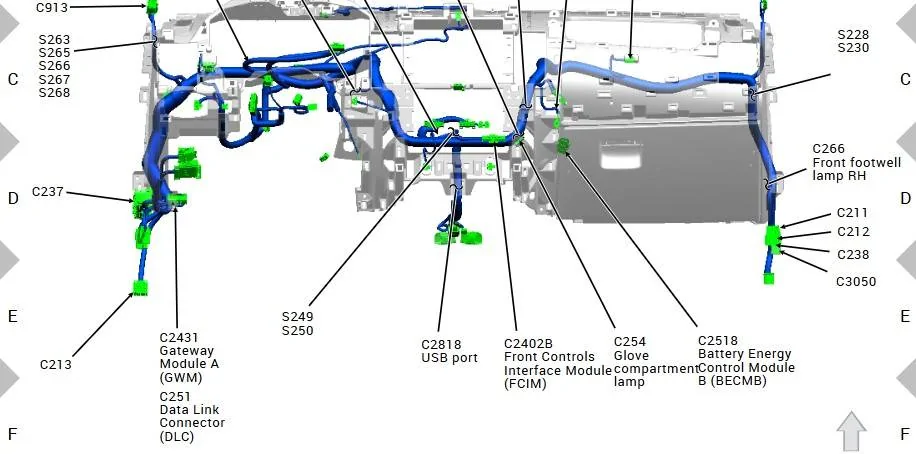
if still no power - attempt to locate C237 - Located near the DLC (OBD Port) it is a 59-Pin connector - so it will be a big one.

And check for power here - C237


PowerPoints.jpeg


C237.jpg


Ground Circuit Check
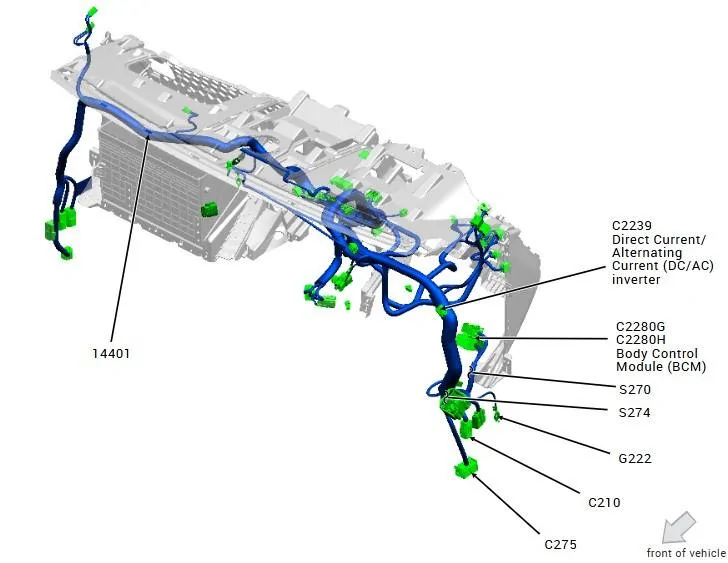
Note this is by the BCM - Left Footwell

G222.jpeg


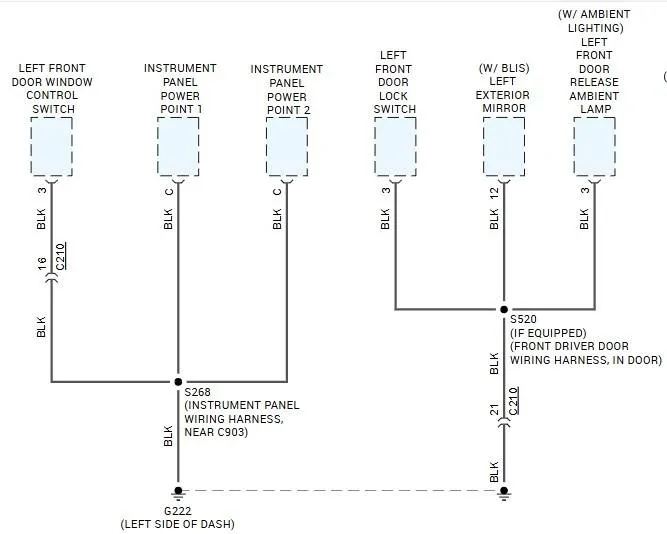
G222 - is a shared ground point - note the items that share that ground and verify normal ops.
just in case it is a ground issue.

You may be experiencing a - Slow Moving Window

G222 - Shared.jpeg
 
Last edited:
OP
OP
RedlandRanger

RedlandRanger

Moderator
First Name
Rob
Joined
Nov 14, 2018
Threads
42
Messages
5,111
Reaction score
11,105
Location
Oregon
Vehicle(s)
2019 Ford Ranger Lariat FX4, 1973 Mercury Capri
Vehicle Showcase
1
The adapter worked fine in my wife's car, and I did try another adapter which did not work in the truck (I didn't try that one in my wife's car).

I've got a new adapter on order and will do some more experimenting on Monday and report back.

Thanks for the very detailed suggestions!
 

airline tech

Well-Known Member
Joined
Aug 24, 2022
Threads
28
Messages
4,456
Reaction score
8,517
Location
Midwest - KS
Vehicle(s)
2022 Ranger Lariat-Super Crew, Cactus Gray
Occupation
Aircraft Tech
Ref: Location of C1035A
Note: C1035A is the Inboard Connector

As you may try disconnecting the battery and pull and check for any corroded pins and reseat the connector.

I would check here if you do not have power at C237, this will also allow you to do a continuity check from the opposite side of the fuse (that you cannot) check (fuse design) to pins 9 & 49 of the BJB. This will isolate that the BJB is good, if you are getting power to the other side of the fuse.

BJB Top View.jpeg
 

Grandaccess

Well-Known Member
First Name
Robert
Joined
Jul 8, 2023
Threads
5
Messages
1,095
Reaction score
2,459
Location
Binghamton, N.Y
Vehicle(s)
2021 Ford Ranger XLT FX4
Occupation
Computer Consultant
any signs of a mouse or rat?
we have a soy based wire insulation they love!
I live out in the middle of no where its a common issue?
one got my rear seat belt sensor but its in an easy place to fix
 

TJC

Well-Known Member
First Name
Tony
Joined
Aug 28, 2020
Threads
45
Messages
3,938
Reaction score
9,886
Location
North Carolina
Vehicle(s)
93 Miata, 05 Ranger 4x4, 20 Ranger 4x4, 23 CX-5
I caught one last night in my garage. They sneak it when I open the garage door. And I never leave the door open. It is used exclusively only for parking the vehicles... open and closed very quickly - 5 minutes at most when unloading groceries. I've got a side door to walk in and out.

I have learned to keep the traps set.
 

Racket

Well-Known Member
First Name
John
Joined
Jan 21, 2020
Threads
22
Messages
2,205
Reaction score
3,406
Location
Here and There
Vehicle(s)
2019 Lariat Supercrew 2WD
Occupation
Transient
It is also possible that the devices being charged pulled too much power and tripped the BCM monitoring circuit
Interesting. Is the truck battery going dead?
Sponsored


Top