airline tech
Well-Known Member
- Joined
- Aug 24, 2022
- Threads
- 28
- Messages
- 4,644
- Reaction score
- 8,884
- Location
- Midwest - KS
- Vehicle(s)
- 2022 Ranger Lariat-Super Crew, Cactus Gray
- Occupation
- Aircraft Tech
Ok I did some digging - I compared the As-Builts for a number of years / trims
I have found only (1) file pertaining to - (Rear Seat Occupant) Alert
If you do not have the (Selection) Option on this screen.
I need someone to post what this As-Built data line reads for your truck.
7D0-09-04
As I have a hunch it reads - 0000-0000-00E4

The APIM (Sync)
7D0-09-04 (Varies some across the trims)
0000-0000-2AOE (This is what my Lariat has) and I have the (selectable) option to turn it off.
0000-0000-2206
0000-0000-00E4
Note: The last 2 characters of any line = the checksum of the line - they will change automatically when anything on the line is altered, so you only need to change the (1) character in the last 4.
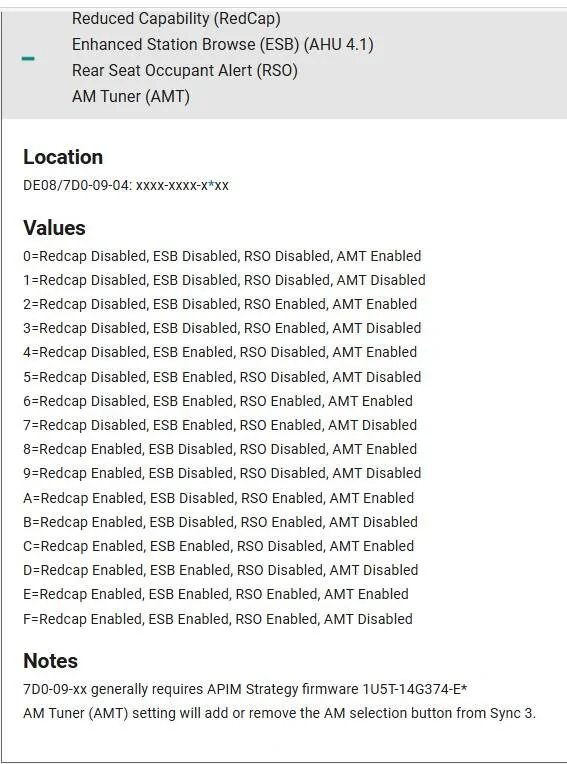
Now pay ATTENTION to the BLUE * below and note what (Hex-Code) you have via the As-Built Data for your truck and note what it is currently showing.
Being that this type of data change affects multiple options.
If yours is showing (0) then the Rear Seat Occupant Alert is Disabled and needs changed to a similar matching (Code) to Enable, it.
Example: Focusing on (00E4) - You would change it to (02xx) as the closest matching line and only enabling the (RSO)
NOTE: I am ASSUMING that this setting is for the (APIM-Sync) screen (Option for Selection) on the screen but MAY be disabling the whole alert. (IDK)
So, if you do not have the selectable option in the Sync Screen this MAY be the key to get it back on the screen
Note: The only 2 option differences are the (RedCap) this ties to (5G) network communication to the SYNC and the (RSO)
The AMT Tuner - Enabled all trims
Enhanced Station Browser - Disabled All Trims

And just for a REF: The 0000-0000-2xxx and 0000-0000-0xxxx)
The first hex of the last set of digits (toggles this setting)
2=Enabled
0=Disabled
Driver Restriction Passenger Exception (DRPE) enabled will allow the front seat passenger in a moving vehicle to operate the navigation and other restricted features.
I have found only (1) file pertaining to - (Rear Seat Occupant) Alert
If you do not have the (Selection) Option on this screen.
I need someone to post what this As-Built data line reads for your truck.
7D0-09-04
As I have a hunch it reads - 0000-0000-00E4
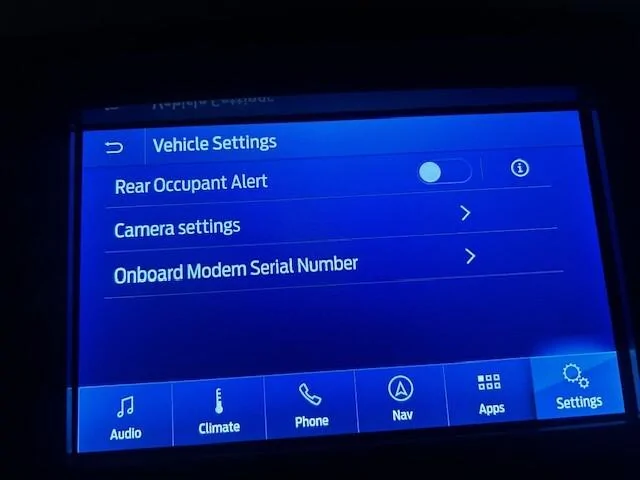
The APIM (Sync)
7D0-09-04 (Varies some across the trims)
0000-0000-2AOE (This is what my Lariat has) and I have the (selectable) option to turn it off.
0000-0000-2206
0000-0000-00E4
Note: The last 2 characters of any line = the checksum of the line - they will change automatically when anything on the line is altered, so you only need to change the (1) character in the last 4.
Now pay ATTENTION to the BLUE * below and note what (Hex-Code) you have via the As-Built Data for your truck and note what it is currently showing.
Being that this type of data change affects multiple options.
If yours is showing (0) then the Rear Seat Occupant Alert is Disabled and needs changed to a similar matching (Code) to Enable, it.
Example: Focusing on (00E4) - You would change it to (02xx) as the closest matching line and only enabling the (RSO)
NOTE: I am ASSUMING that this setting is for the (APIM-Sync) screen (Option for Selection) on the screen but MAY be disabling the whole alert. (IDK)
So, if you do not have the selectable option in the Sync Screen this MAY be the key to get it back on the screen
Note: The only 2 option differences are the (RedCap) this ties to (5G) network communication to the SYNC and the (RSO)
The AMT Tuner - Enabled all trims
Enhanced Station Browser - Disabled All Trims
And just for a REF: The 0000-0000-2xxx and 0000-0000-0xxxx)
The first hex of the last set of digits (toggles this setting)
2=Enabled
0=Disabled
Driver Restriction Passenger Exception (DRPE) enabled will allow the front seat passenger in a moving vehicle to operate the navigation and other restricted features.
Sponsored