Sponsored

Ford app on phone

Dan Keil

Well-Known Member
First Name
Dan
Joined
May 22, 2020
Threads
1
Messages
59
Reaction score
52
Location
Decatur,Il
Vehicle(s)
2019 Ford Ranger XLT 4X4
Occupation
Walmart Associate
I bought a used 2019 Ranger and I had the Ford App. I could schedule a start time. I bought my new 2019 Ranger and I transferred my truck on the app. I cannot set a time for my truck to start now??? Any ideas?
Sponsored
 

Porpoise Hork

Well-Known Member
First Name
Bret
Joined
Apr 28, 2020
Threads
19
Messages
1,316
Reaction score
2,366
Location
Houston
Vehicle(s)
2022 F150 XLT Powerboost FX4 302A Oxford White
Occupation
IT
I had similar issues with the remote start and door locks. Had to remove the truck and add it back into the app for it to start working correctly. Also make sure that the truck is seeing a cell signal and that the app/website can see the truck and is properly updating. There have been a few 2019's that have had the modems go out preventing them from communicating with the app.
 
OP
OP
Dan Keil

Dan Keil

Well-Known Member
First Name
Dan
Joined
May 22, 2020
Threads
1
Messages
59
Reaction score
52
Location
Decatur,Il
Vehicle(s)
2019 Ford Ranger XLT 4X4
Occupation
Walmart Associate
The truck sees the phone ok. It puts my phone on the screen. So I will try to remove it and scan it back in. Ford chat person tried, but I didn't have the time. I will do it tomorrow and report back in!
THANK YOU!
 
OP
OP
Dan Keil

Dan Keil

Well-Known Member
First Name
Dan
Joined
May 22, 2020
Threads
1
Messages
59
Reaction score
52
Location
Decatur,Il
Vehicle(s)
2019 Ford Ranger XLT 4X4
Occupation
Walmart Associate
Took truck off got it reconnected. I still can not set a start time. It is not on there. I refreshed the app
Twice, to no avail. What now??
 
OP
OP
Dan Keil

Dan Keil

Well-Known Member
First Name
Dan
Joined
May 22, 2020
Threads
1
Messages
59
Reaction score
52
Location
Decatur,Il
Vehicle(s)
2019 Ford Ranger XLT 4X4
Occupation
Walmart Associate
After taking it off and adding it again, I still have not the ability to set up a time to start it.
I am going to my dealer Monday I will bring that up.
I am having problems with brake applied vehicle slowed down, whenever I slow up it goes on


Porpoise Hork

Well-Known Member
First Name
Bret
Joined
Apr 28, 2020
Threads
19
Messages
1,316
Reaction score
2,366
Location
Houston
Vehicle(s)
2022 F150 XLT Powerboost FX4 302A Oxford White
Occupation
IT
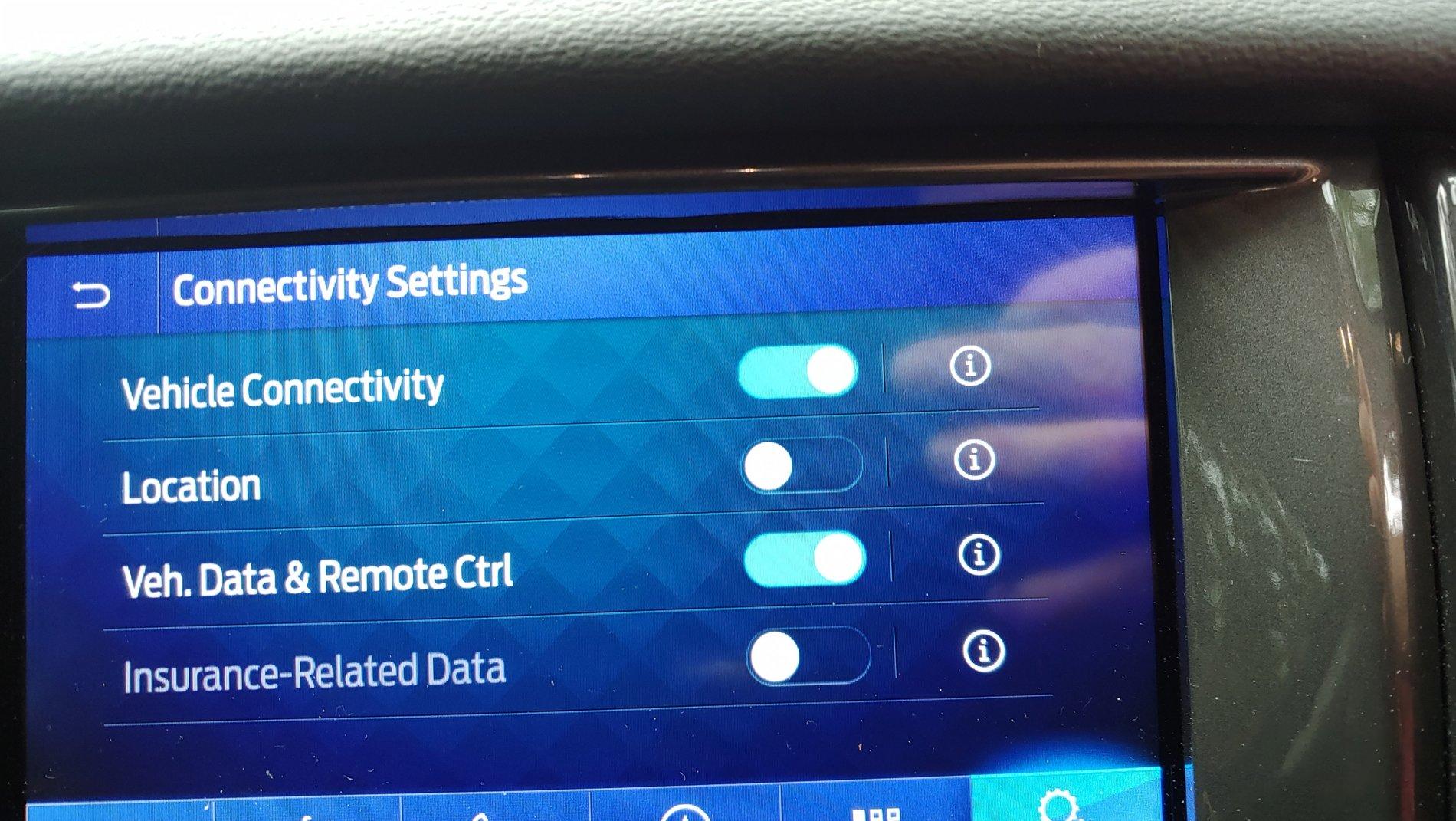
Try this first. Go in to Settings -> FordPass ->Connectivity Settings and check to make sure that both the Vehicle Connectivity and Veh. Data & Remote Ctrl options are turned on. Location is not needed unless you want to have the truck location tracked.

20200622_173048_resized.jpg


If these are off then the things like remote lock/unlock, remote and scheduled start will not work. If they are both on try performing a master reset on the Sync system and then see if it will work. If it still won't allow the scheduled start or other remote options then yes take it in.
 
OP
OP
Dan Keil

Dan Keil

Well-Known Member
First Name
Dan
Joined
May 22, 2020
Threads
1
Messages
59
Reaction score
52
Location
Decatur,Il
Vehicle(s)
2019 Ford Ranger XLT 4X4
Occupation
Walmart Associate
I checked every button is on! Now what???
 

Ace Holliday

Well-Known Member
First Name
Scott K
Joined
Apr 19, 2020
Threads
5
Messages
405
Reaction score
890
Location
South Kalifornikstan
Vehicle(s)
2019 Ranger XLT Super Crew
Occupation
Aerospace Machinist/CNC Programmer - Retired
I checked every button is on! Now what???
Have you turned your phone off then on? May seem like a silly question but it works a lot of the time. Also be sure to do the Master Reset on Sync 3 as suggested by another person above.
 

Porpoise Hork

Well-Known Member
First Name
Bret
Joined
Apr 28, 2020
Threads
19
Messages
1,316
Reaction score
2,366
Location
Houston
Vehicle(s)
2022 F150 XLT Powerboost FX4 302A Oxford White
Occupation
IT
You can try resetting the Sync system to see if it will properly connect after that. Also check to see if there are any updates available for it as it may be on a much older build and is not allowing the App to properly access the system and complete the remote start schedule. Some of the early 2019's were not updated to Sync 3.4 as it came out mid-year in the production run.

https://www.ranger5g.com/forum/threads/just-updated-to-sync-3-4-on-my-ranger-2019.5988/

You can also manually update it using the Cyan Labs updater tool. I with many others have used this tool to get mine updated to 3.4.20136 and so far have not had any issues with it.
 
OP
OP
Dan Keil

Dan Keil

Well-Known Member
First Name
Dan
Joined
May 22, 2020
Threads
1
Messages
59
Reaction score
52
Location
Decatur,Il
Vehicle(s)
2019 Ford Ranger XLT 4X4
Occupation
Walmart Associate
I have turned my phone off and on no action.
How do I shut my sync system
 

Porpoise Hork

Well-Known Member
First Name
Bret
Joined
Apr 28, 2020
Threads
19
Messages
1,316
Reaction score
2,366
Location
Houston
Vehicle(s)
2022 F150 XLT Powerboost FX4 302A Oxford White
Occupation
IT
To do a master reset? Go into Settings -> General, and scroll to the bottom of the menu. You should see Master Reset. Click that and confirm the action. This will take 3-5 min to complete and the system should power back on to the navigation screen. From there it may take another 5 min. to get all the map and other icons for everything to load.
 
OP
OP
Dan Keil

Dan Keil

Well-Known Member
First Name
Dan
Joined
May 22, 2020
Threads
1
Messages
59
Reaction score
52
Location
Decatur,Il
Vehicle(s)
2019 Ford Ranger XLT 4X4
Occupation
Walmart Associate
let me look!
 

Porpoise Hork

Well-Known Member
First Name
Bret
Joined
Apr 28, 2020
Threads
19
Messages
1,316
Reaction score
2,366
Location
Houston
Vehicle(s)
2022 F150 XLT Powerboost FX4 302A Oxford White
Occupation
IT
What tech package does the truck have?


Top