Gizmokid2005
Well-Known Member
- Joined
- Dec 1, 2019
- Threads
- 13
- Messages
- 1,279
- Reaction score
- 1,875
- Location
- GA
- Website
- gizmokid2005.com
- Vehicle(s)
- 2019 Ford Ranger XLT 4X4 SCrew
- Occupation
- SQL Developer
- Vehicle Showcase
- 1
- Thread starter
- #1
Hey all, obligatory first post, happy to be back in the Ranger crowd!
I have done a fair bit of searching, dug through old threads here and various other places, but with the fact that people seem to use bed lighting and cargo lighting interchangeably and the fact that there's a lot of wonderful in-bed lighting options, it has been hard to find anything.
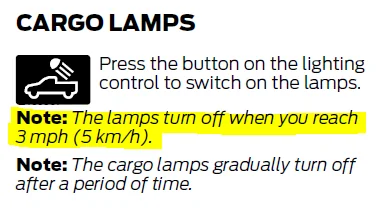
There is a button on the dash, just to the right of the light switch, for the cargo light at the top of the cab. However, I cannot find *anywhere* that there is a notification that this light is actually on. Am I missing something? If not, has anyone found a way to actually get an indication of the status of this light? It seems like an led in the button itself should have been the perfect solution to this, if not something in the dash.
I have done a fair bit of searching, dug through old threads here and various other places, but with the fact that people seem to use bed lighting and cargo lighting interchangeably and the fact that there's a lot of wonderful in-bed lighting options, it has been hard to find anything.
There is a button on the dash, just to the right of the light switch, for the cargo light at the top of the cab. However, I cannot find *anywhere* that there is a notification that this light is actually on. Am I missing something? If not, has anyone found a way to actually get an indication of the status of this light? It seems like an led in the button itself should have been the perfect solution to this, if not something in the dash.
Sponsored