Dr_Strangelove
Well-Known Member
- First Name
- Adam
- Joined
- Oct 14, 2022
- Threads
- 13
- Messages
- 1,138
- Reaction score
- 5,227
- Location
- Henderson, NV
- Vehicle(s)
- '22 XLT Supercrew 4x4
- Occupation
- Art, Design, Photo & Video
- Thread starter
- #1
Hey Gang - I see a lot of two things on these forums since joining: conversations revolving around MPG and the Fuelly app. Well, as an Android user I went looking for Fuelly and found out it's kind of an iPhone thing. They stopped supporting Android in 2014. Looking for alternatives I found Fuelio and have been using it in my truck the last month. Thought I'd post about it in case any fellow Android users have been looking for our own "Fuelly". For what it's worth, it is also available for Apple devices and Apple Car Play.
To me it's very important that this App launches in Android Auto, because otherwise I might as well just be jotting this all down in a spreadsheet on my phone. Alas, here she is! Upon launching Fuelio, you're greeted with its "Showpiece" which is a "cheap fuel finder" integrated with Google Maps. Behold:

If the gas station happens to be both 1) in the Fuelio system and 2) uploads their fuel prices to Google, then Fuelio will automatically input the data that is available to it via Google when it comes time to log your fuel stop. In my case, this Shell station was too new (6 months old,) to be in the Fuelio system but was appearing on Google maps. Fuelio was telling me to go 1.5 miles down the road to the older Shell station. This meant I had to put the fuel price data in myself - oh well. The cool thing is - because the Shell station was detected by Google Maps - Fuelio did log my data as a Shell station fuel stop nonetheless.
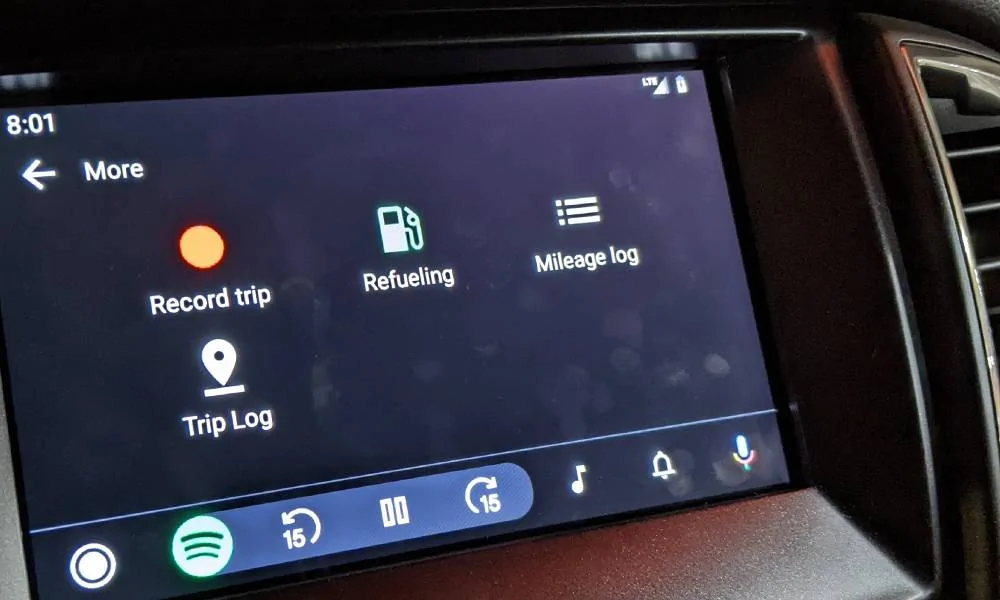
If you don't have the ability to log an automatic entry - you can access the menu by tapping the three dots in the corner and manually enter either a trip or a fuel stop.
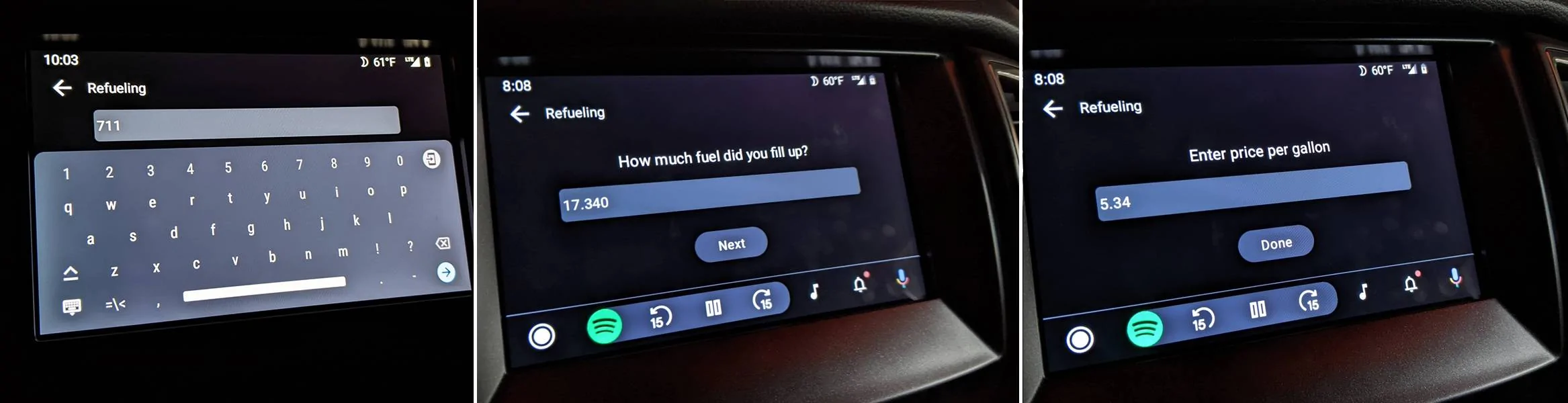
Inputting the data is fairly straightforward and what you'd expect. Odometer reading, Fuel price, Fuel input in gallons (units can be changed,) and viola, you've got a data entry. The keyboard pops up both on the dashboard screen as well as your phone, so you can use whatever interface you prefer. I prefer the dashboard.

After the data is entered - you can access your trip summaries via the main menu and see you entries, and changes in MPG, fuel price, and fuel fill between trips.
The first icon is a generic fuel pump because it was entered manually from my break in notes after I installed the app. Believe it or not I am fun at parties.
Overall I'd not give this app a raving review - it does what I needed it to do which is keep track of my fuel stops and then calculate actual MPG for me. Keeping track of what I pay will probably only make me cry, and amount filled is of no interest to me personally. There are not any social features like Fuelly has - so there is no way for me to share this data with everyone without posting lame screenshots.
If you're on an Android like me - if you want an App that fires up in Android Auto and you're unwilling to deal with the Fuelly web interface - this is what we got!
Thanks for reading folks.
To me it's very important that this App launches in Android Auto, because otherwise I might as well just be jotting this all down in a spreadsheet on my phone. Alas, here she is! Upon launching Fuelio, you're greeted with its "Showpiece" which is a "cheap fuel finder" integrated with Google Maps. Behold:
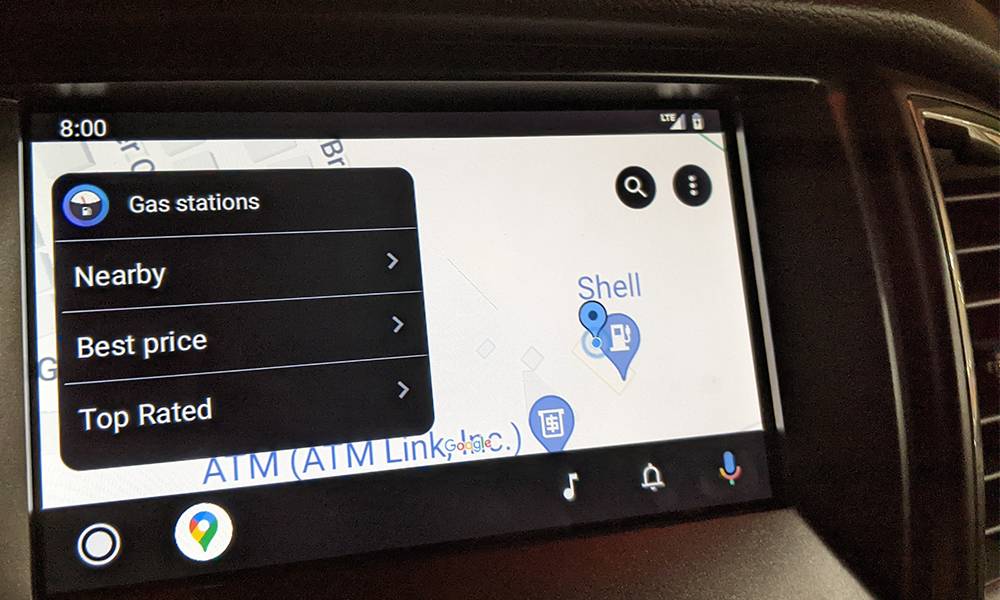
If the gas station happens to be both 1) in the Fuelio system and 2) uploads their fuel prices to Google, then Fuelio will automatically input the data that is available to it via Google when it comes time to log your fuel stop. In my case, this Shell station was too new (6 months old,) to be in the Fuelio system but was appearing on Google maps. Fuelio was telling me to go 1.5 miles down the road to the older Shell station. This meant I had to put the fuel price data in myself - oh well. The cool thing is - because the Shell station was detected by Google Maps - Fuelio did log my data as a Shell station fuel stop nonetheless.
If you don't have the ability to log an automatic entry - you can access the menu by tapping the three dots in the corner and manually enter either a trip or a fuel stop.
Inputting the data is fairly straightforward and what you'd expect. Odometer reading, Fuel price, Fuel input in gallons (units can be changed,) and viola, you've got a data entry. The keyboard pops up both on the dashboard screen as well as your phone, so you can use whatever interface you prefer. I prefer the dashboard.
After the data is entered - you can access your trip summaries via the main menu and see you entries, and changes in MPG, fuel price, and fuel fill between trips.
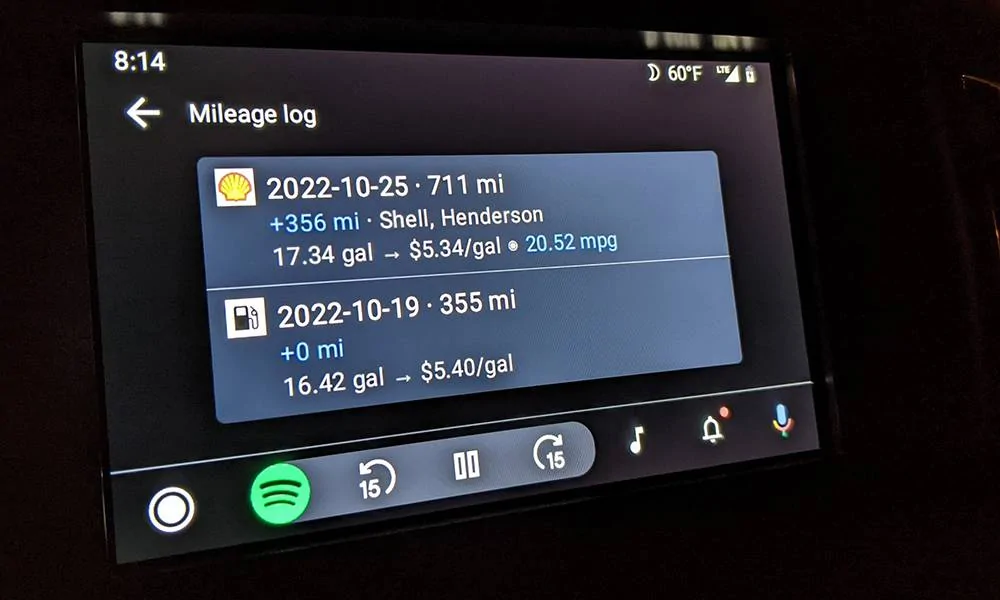
The first icon is a generic fuel pump because it was entered manually from my break in notes after I installed the app. Believe it or not I am fun at parties.
Overall I'd not give this app a raving review - it does what I needed it to do which is keep track of my fuel stops and then calculate actual MPG for me. Keeping track of what I pay will probably only make me cry, and amount filled is of no interest to me personally. There are not any social features like Fuelly has - so there is no way for me to share this data with everyone without posting lame screenshots.
If you're on an Android like me - if you want an App that fires up in Android Auto and you're unwilling to deal with the Fuelly web interface - this is what we got!
Thanks for reading folks.
Sponsored