Sponsored

Backup Camera Malfunction

canyonslicker

Well-Known Member
First Name
Andy
Joined
Jun 13, 2021
Threads
43
Messages
1,437
Reaction score
5,294
Location
California
Vehicle(s)
2021 Ranger Lariat
Occupation
65 YO Juvenile Delinquent
Just wanted to give you some other options for a possible fix, just in case the system needs a reset / reboot.

Disconnect Battery for 5 minutes or so
or
Hard Reset the Sync Module: But you may lose programmed presets (IDK)
Somewhere in the settings on the display is a reset option, I just don't know exactly how to get to it without physically doing it myself.
or
The system incorporates a few modules for the Rear Camera

Try Pulling and Reseating some fuses.

SYNC / APIM - Fuse 31 -- BCM (By your left knee) - Display Screen

DC/DC Convertor - Fuse 23 --- BJB (Engine Bay) - Powers the Rear Camera

BCM - (Lin 4) Communication to the Rear Camera, I think this is the input (switch) to power the camera when you go to reverse. (?) (Fuse 34) - BCM (by your left knee)

I'm out of options now without a code, hopefully
@P. A. Schilke and @airline tech between the two of you is what makes this site tech savvy and many other contributors I don’t want to discount.
BTW have you seen Dave @AzScorpion lately?
Sponsored
 
OP
OP

JasonT1273

Active Member
First Name
Jason
Joined
Aug 30, 2023
Threads
3
Messages
33
Reaction score
28
Location
Ohio, USA
Vehicle(s)
2019 Ford Ranger XLT SuperCrew
Occupation
Premier Service Consultant
I have no idea, but I would guess the camera is digital. If that is true, then it's more likely a camera issue. Total WAG.
I had already tried a new camera unit. No go.
 
OP
OP

JasonT1273

Active Member
First Name
Jason
Joined
Aug 30, 2023
Threads
3
Messages
33
Reaction score
28
Location
Ohio, USA
Vehicle(s)
2019 Ford Ranger XLT SuperCrew
Occupation
Premier Service Consultant
Just wanted to give you some other options for a possible fix, just in case the system needs a reset / reboot.

Disconnect Battery for 5 minutes or so
or
Hard Reset the Sync Module: But you may lose programmed presets (IDK)
Somewhere in the settings on the display is a reset option, I just don't know exactly how to get to it without physically doing it myself.
or
The system incorporates a few modules for the Rear Camera

Try Pulling and Reseating some fuses.

SYNC / APIM - Fuse 31 -- BCM (By your left knee) - Display Screen

DC/DC Convertor - Fuse 23 --- BJB (Engine Bay) - Powers the Rear Camera

BCM - (Lin 4) Communication to the Rear Camera, I think this is the input (switch) to power the camera when you go to reverse. (?) (Fuse 34) - BCM (by your left knee)

I'm out of options now without a code, hopefully one of these options will help.
I had done the reset right after I got the truck in order to be able to setup FordPass. I'm getting ready to try the fuses and codes right after I finish this reply.
 

canyonslicker

Well-Known Member
First Name
Andy
Joined
Jun 13, 2021
Threads
43
Messages
1,437
Reaction score
5,294
Location
California
Vehicle(s)
2021 Ranger Lariat
Occupation
65 YO Juvenile Delinquent
I hope it works!!! Sometimes it takes awhile for it to “stick”. I think AT was alluding to a coaxial cable connection which makes sense. So look for that in the harness connections. There may be breakage you can’t readily see. Do a wiggle test on any coax you see. IDK just spitballing.
 
OP
OP

JasonT1273

Active Member
First Name
Jason
Joined
Aug 30, 2023
Threads
3
Messages
33
Reaction score
28
Location
Ohio, USA
Vehicle(s)
2019 Ford Ranger XLT SuperCrew
Occupation
Premier Service Consultant
You will need to hook up scanner and pull any (B) Body or (C) Communication codes to pinpoint it down.
You might try running system self-test on the BCM, IPM, and APIM, running the test mainly on the IPM will initialize the rear camera.
Try those first, then post the code if no help.

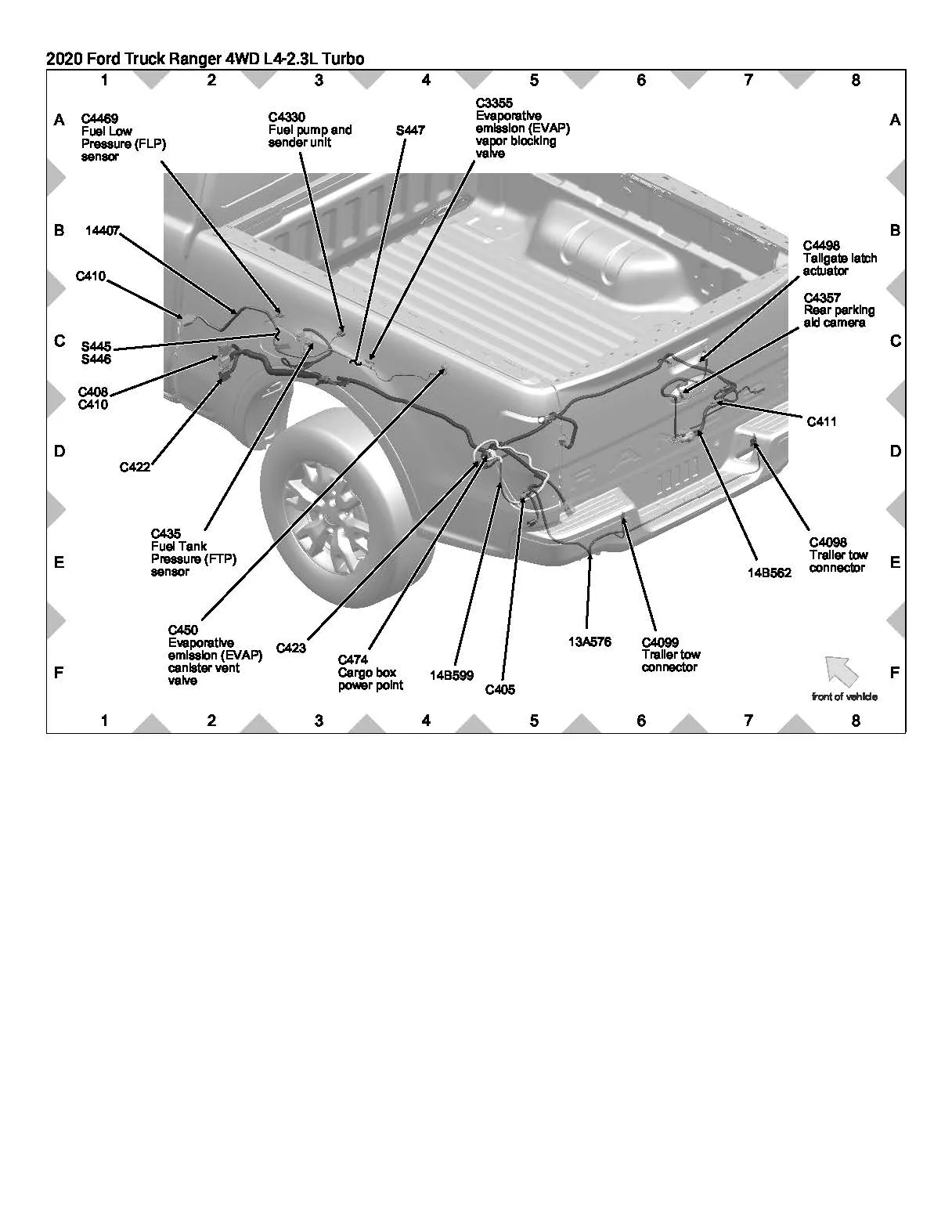
Note: There are 2 other (exterior) inline connectors that feed the camera

C411
C422

Rear Camera Inline .jpg
I ran the tests you recommended. APIM and IPM showed no DTCs.
BCM test showed the following:

(OK) [21:43:53.847] On Demand Self-Test has been started
(WARN) [21:44:17.362] Test completed, found DTCs: B1305:01, B143B:11, B143C:11, B1448:15, B115E:08

B115E:08 appears to be related to the camera. Thoughts on all?


airline tech

Well-Known Member
Joined
Aug 24, 2022
Threads
28
Messages
4,456
Reaction score
8,519
Location
Midwest - KS
Vehicle(s)
2022 Ranger Lariat-Super Crew, Cactus Gray
Occupation
Aircraft Tech
Did you try clearing the codes?
and if so, which ones came back after another BCM self-test
 
OP
OP

JasonT1273

Active Member
First Name
Jason
Joined
Aug 30, 2023
Threads
3
Messages
33
Reaction score
28
Location
Ohio, USA
Vehicle(s)
2019 Ford Ranger XLT SuperCrew
Occupation
Premier Service Consultant
Did you try clearing the codes?
and if so, which ones came back after another BCM self-test
B1448:15, B115E:08
I forgot to clear them all before copying and pasting from the log.
 

airline tech

Well-Known Member
Joined
Aug 24, 2022
Threads
28
Messages
4,456
Reaction score
8,519
Location
Midwest - KS
Vehicle(s)
2022 Ranger Lariat-Super Crew, Cactus Gray
Occupation
Aircraft Tech
Ok,

Codes: First Run
B1305:01 - Hood Latch , Hood Open During Test (?)

Related:

B143B:11 - Short to Grd -Autolamp Circuit - Input
B143C:11 - Short to Grd - on Headlamp Circuit Input
B1448:15 - R/R Stop Position Lamp - Short to Batt or Open - Output Circuit, this one is confusing because if you dig into the code, it has you check the RF Side Marker Light,

So, check that for proper operation and compare to the LF Side marker.

I think the side marker is generating the other (2)
Note: If I recall tapping into the RF side marker light is a popular spot for getting a power source for extra front lighting, Grille Lights etc - Might check wiring at the light, If it was done properly there would be a harness (Tee) adaptor on it.

Camera:

B115E:08 is a generic code - Cam Module Bus / Signal Message Missing on LIN Circuit
It leads you down a in depth wire check, which may be a wiring issue.

But first try finding anything in Forscan about Rear Parking Aid - Initialization as it may just need to be reconfigured.

So, it may take some Indepth wire checks for a fix, but I would try to at least pull and clean C411.
and with a trusty helper - put truck in reverse - - to get camera up and shake the harness where it comes out of the tailgate and note any camera display difference

Thats all of the easy checks and depending on how comfortable you are with a meter; the rest is checking for circuit integrity. But for a full test involves ripping part of the dash out to get access to the APIM Connector, the BCM Connector is at least easy access.

If all above options do not work, then it is a dive into the wiring.

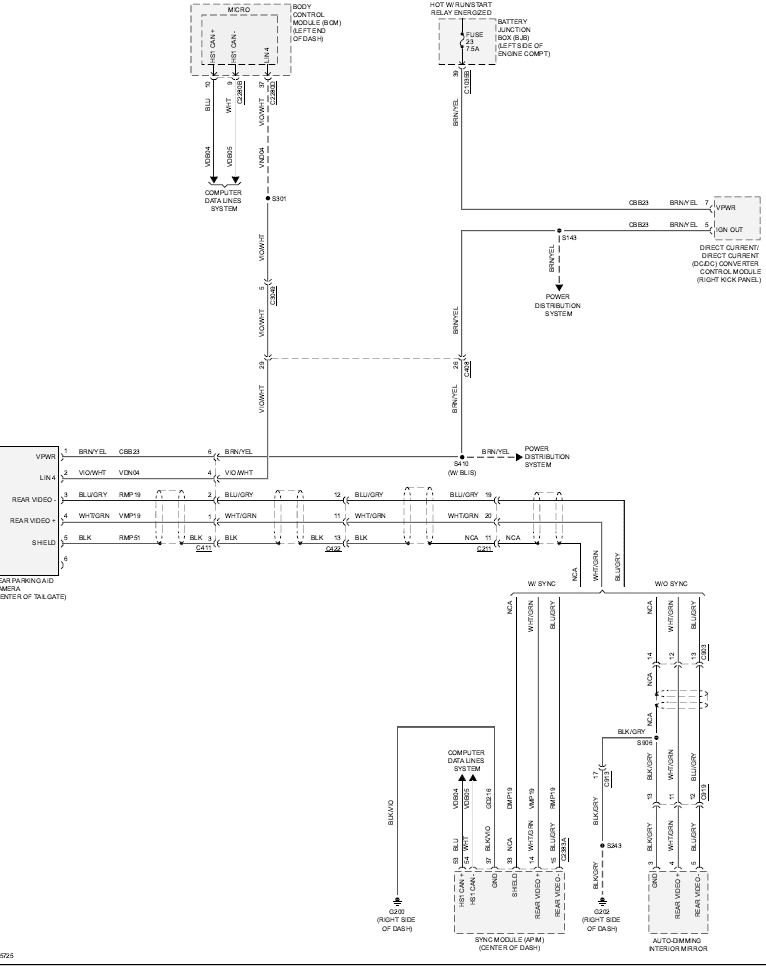
I would at least start with a simple Power & Grd check:

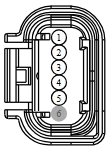
C4357 = Camera Connector

Key On

C4357 - Pin #1 to Grd - 12 Volts

Key Off

C4357 - Pin #5 to Grd - 3 Ohms

1693629725917.webp


Terminal Part Number
Service Part Number
Size
8U5T-14474-BADU2Z-14474-CA0.64

Pin
Circuit
Gauge
Circuit Function
Qualifier
Terminal Part Number
1​
CBB23 (BN-YE)​
20​
FUSE - 23 OR CIRCUIT BREAKER​
8U5T-14474-BA​
2​
VDN04 (VT-WH)​
20​
CTRL MOD. - LIN BUS # 4​
8U5T-14474-BA​
3​
RMP19 (BU-GY)​
20​
CAMERA - PARKING AID REAR VIDEO -​
8U5T-14474-BA​
4​
VMP19 (WH-GN)​
20​
CAMERA - PARKING AID REAR VIDEO +​
8U5T-14474-BA​
5​
RMP51 (BK)​
20​
CAMERA - PARKING AID REAR VIDEO D​
8U5T-14474-BA​
6​
*​
*​
Not Used​
N/A​
 

airline tech

Well-Known Member
Joined
Aug 24, 2022
Threads
28
Messages
4,456
Reaction score
8,519
Location
Midwest - KS
Vehicle(s)
2022 Ranger Lariat-Super Crew, Cactus Gray
Occupation
Aircraft Tech
If we only focus on the message -Com Bus Signal Message
And think outside the box, I would focus on the LIN Circuit.

The Lin Circuit is the customizing control (zoom) of the camera.
So, with that known and you have checked and cleaned connector C411.

The BCM controls this via the Input from the APIM, (Sync-Screen)

1. Reset - The Sync Screen (if no help)

2. Pull and Reseat Fuses - At the BCM - Fuse 34 - Lin Circuit Feed
Fuse 31 - APIM Sync Screen

3. With Rear Camera On - Try adjusting the Camera Zoom and any other camera control, as I think the camera just needs to move (focus wise)
 

airline tech

Well-Known Member
Joined
Aug 24, 2022
Threads
28
Messages
4,456
Reaction score
8,519
Location
Midwest - KS
Vehicle(s)
2022 Ranger Lariat-Super Crew, Cactus Gray
Occupation
Aircraft Tech
Almost finished with a video conversion project - What Fun

Anyway, while waiting I dug some more and have a better understanding of the system.


While remembering back to an earlier thread on the camera I had posted some PDF's that relate to your issue.
and since it appears you have an issue with the Lin communication, I did some digging and found the answer to the OP's question of that thread.
I also remembered this info from that post, that may shed some light on your issue.
It's going to probably be the Camera Needs Initialized.

So, as I just discovered for the previous thread, read my last post on that thread.

I now think that this is most likely the issue, the BCM is not communicating to the Camera, its needs initialized, or this circuit is corrupt.


LIN Communication

The BCM and the rear parking aid camera communicate via a LIN circuit which is a dedicated single wire communication network.

The messages sent from the BCM to the camera are:

  • Camera configuration data
  • Display manual zoom request
  • Guideline on/off request
  • Trailer connection status (if equipped with trailer tow)
  • Steering angle
  • Standby enable/disable request
The messages sent from the camera to the BCM are:

  • Camera status
  • Display zoom status
  • Camera part number data
  • Guideline status

So, if we take the Code B115E:08: And the wording of that code Signal Message Missing

I think it's looking for the Camera Part Number Data to the BCM
So, it can set the Camera Configuration Data and initialize it.

Note: The Pinpoint test for this only has you do wire checks, this is me thinking outside the box
I hope this is all it needs. Replacement requires initialization with scanner per manual, I do not know if Forscan can do it.
This is most likely going to be a dealer thing as this is a network message task.
So you need to find something in Forscan relating to the BCM -Rear Camera or LIN Network New Module Initialization

Now, this is where a battery disconnect might help, it may do this automatically after a battery disconnect.
or pull fuse 34 @ the BCM for 5 minutes or so as an alternate to doing it with a scanner.

In Forscan, there may be something in the BCM, easy mode showing the rear camera, I would have to hook up to check myself as I have not played with Forscan alot
But the option to do this procedure is in the BCM Module configuration data, or similiar wording.

It may be tied into the As-Built, but I do not know what Hex-Line is for the camera, plus if the part # is different from original won't work anyway unless you manually change the As-Built file.
and without knowing what Hex-Line to change, it's a needle in a haystack.
If you find anything in Forscan about the Camera or Lin Network (new part) it should do it automatically.

You should see wording similar to this in Forscan: I do not know if Forscan has this option on the Ranger.

1. Rear camera calibration
2. Local Interconnect Network New Module Calibration
This is what I believe needs to be done.

Forscan - Can be Dangerous if you just start changing things, so don't do anything you are unsure about.

Ref this link for previous post:

Do "we" know how the reverse camera feed is trigger? | 2019+ Ford Ranger and Raptor Forum (5th Generation) - Ranger5G.com
 
Last edited:
OP
OP

JasonT1273

Active Member
First Name
Jason
Joined
Aug 30, 2023
Threads
3
Messages
33
Reaction score
28
Location
Ohio, USA
Vehicle(s)
2019 Ford Ranger XLT SuperCrew
Occupation
Premier Service Consultant
That is a whole lot of data! Thank you for all of that. I do have a meter to at least do the voltage and resistance check you mentioned. The rest will take me a bit of reading on a larger screen than my phone to wrap my head around. LOL I did do the wiggle test at the bottom of the tailgate with no apparent effect but I will get a closer look at C411 hopefully later today. Thanks again.
 
OP
OP

JasonT1273

Active Member
First Name
Jason
Joined
Aug 30, 2023
Threads
3
Messages
33
Reaction score
28
Location
Ohio, USA
Vehicle(s)
2019 Ford Ranger XLT SuperCrew
Occupation
Premier Service Consultant
So all the connectors appear to be in good condition. Which one refers to the BCM connector? Is that what C422 is or is it located elsewhere? I am going to grab my meter and run the camera connector check you suggested. I'll also check Forscan for any initialization. If I swap the camera itself fo you think it would require reinitialization?
 

airline tech

Well-Known Member
Joined
Aug 24, 2022
Threads
28
Messages
4,456
Reaction score
8,519
Location
Midwest - KS
Vehicle(s)
2022 Ranger Lariat-Super Crew, Cactus Gray
Occupation
Aircraft Tech
There are a few more connectors in the cab,

If running a new install initialization on it does not fix the issue we can check the other connectors.

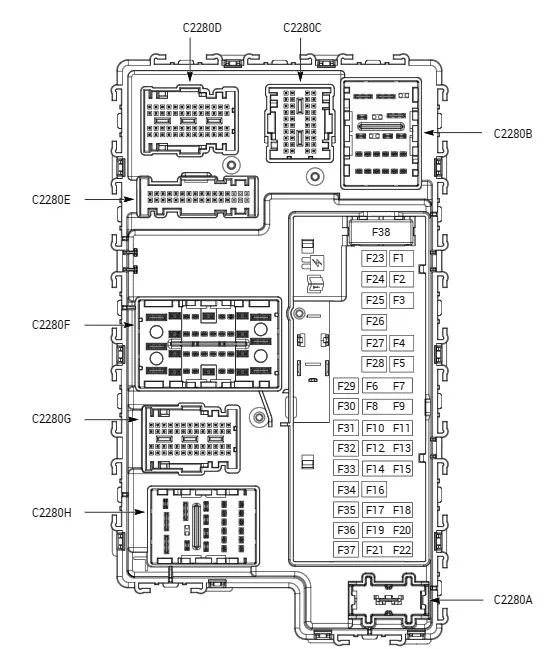
But try the easy access first. C2280D - BCM - By your left knee.
So specific info, did camera ever work?
Did original camera have same image display issue?
You swapped in new camera and same result or different result?


1693926046142.webp


1693926552659.png
 
OP
OP

JasonT1273

Active Member
First Name
Jason
Joined
Aug 30, 2023
Threads
3
Messages
33
Reaction score
28
Location
Ohio, USA
Vehicle(s)
2019 Ford Ranger XLT SuperCrew
Occupation
Premier Service Consultant
I just bought the truck used as-is a few weeks ago and it was already malfunctioning. The warranty I bought doesn't cover the camera. When I swapped the camera for a new one it was exactly the same image result, distorted then camera not available. I've never run any new install initialization, only cleared codes after putting the original camera back in.
 

airline tech

Well-Known Member
Joined
Aug 24, 2022
Threads
28
Messages
4,456
Reaction score
8,519
Location
Midwest - KS
Vehicle(s)
2022 Ranger Lariat-Super Crew, Cactus Gray
Occupation
Aircraft Tech
I am curious if the lighting circuit issue is taking out the camera, I would check all exterior lights and compare Left / Right
Plus pull RR taillight assy and disconnect the connector and see if camera comes back.
A voltage annomoly in the taillight, due to the cross traffic from the BLIS may be a factor
Plus if the wiring for the lights is running along or near the camera video feed , might be bleeding together. (???)
I would address the lights first then backtrack to the camera issue
Sponsored


Top