Sponsored

Cant Activate "Dedicated DRL" On 2020 XLT?

AvockAdoo

Well-Known Member
First Name
Sam
Joined
Jan 7, 2022
Threads
9
Messages
136
Reaction score
238
Location
Denver, Colorado
Vehicle(s)
2020 Ranger XLT
Occupation
Engineer
Hey all - apologies if this has been answered, but I feel I've done my due diligence searching terms on here.

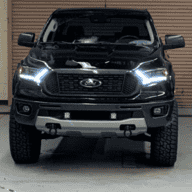
The Story: I just installed alpharex PRO's (and have the LED replacement bulbs on the way), and want to enable dedicated DRL so that my low beams arent on, rather just the LED surround on the headlights.

In forscan it keeps erroring out when I try to change from low beams to dedicated drl. Can you just not do it on the XLT? I think I'm getting the same effect by unchecking the DRL on the in truck menu, but wondering if there is a different way I should be doing this so that I have the DRL strips on, but no headlight bulb unless they're actually "on".

Thanks for the help in advance
Sponsored

 

cfhgarza

Well-Known Member
Joined
Jul 30, 2020
Threads
21
Messages
641
Reaction score
1,287
Location
Ohio
Vehicle(s)
2020 Magnetic XLT 301A
Occupation
Press and weld set-up
It worked on my 2020 XLT.

Did you try rebooting the computer?
What error are you getting?
Is your battery voltage ok?
What ODBII cable are you using?
 

AdamHarris

Well-Known Member
First Name
Adam
Joined
Feb 26, 2021
Threads
32
Messages
1,740
Reaction score
4,919
Location
Blue Oval City, TN
Vehicle(s)
2020 Ford Ranger XLT FX4 Black Supercrew
Occupation
Collision Repair Instructor
Vehicle Showcase
1
If I remember it’s not really something you even have todo in forscan. The Pros circuitry makes the change automatically.
 
OP
OP
AvockAdoo

AvockAdoo

Well-Known Member
First Name
Sam
Joined
Jan 7, 2022
Threads
9
Messages
136
Reaction score
238
Location
Denver, Colorado
Vehicle(s)
2020 Ranger XLT
Occupation
Engineer
It worked on my 2020 XLT.

Did you try rebooting the computer?
What error are you getting?
Is your battery voltage ok?
What ODBII cable are you using?
I have not tried rebooting the computer - but I will give that a shot. Error is "vehicle conditions not satisfied" or something along those lines. Battery voltage is good to go - other items are writing totally fine.

The cable I'm using is: https://www.amazon.com/dp/B081VQVD3F?psc=1&ref=ppx_yo2_dt_b_product_details

I'm pretty sure thats the one everybody recommended.

Turning off the DRLs in the truck menu did "Work" but it feels like more of a patch than anything.

Maybe I'm spliced into the wrong fuse? Currently tapping fuse 24.

Thanks again!
 

cfhgarza

Well-Known Member
Joined
Jul 30, 2020
Threads
21
Messages
641
Reaction score
1,287
Location
Ohio
Vehicle(s)
2020 Magnetic XLT 301A
Occupation
Press and weld set-up
I have not tried rebooting the computer - but I will give that a shot. Error is "vehicle conditions not satisfied" or something along those lines. Battery voltage is good to go - other items are writing totally fine.

The cable I'm using is: https://www.amazon.com/dp/B081VQVD3F?psc=1&ref=ppx_yo2_dt_b_product_details

I'm pretty sure thats the one everybody recommended.

Turning off the DRLs in the truck menu did "Work" but it feels like more of a patch than anything.

Maybe I'm spliced into the wrong fuse? Currently tapping fuse 24.

Thanks again!
I have had issues with forscan and a reboot fixed the problem.

If you had to tap into a fuse for DRL I would think that wire would control them and you wouldn't need to do anything in forscan. Turning off the DRL in the menu should be ok
 

cfhgarza

Well-Known Member
Joined
Jul 30, 2020
Threads
21
Messages
641
Reaction score
1,287
Location
Ohio
Vehicle(s)
2020 Magnetic XLT 301A
Occupation
Press and weld set-up
Just wanted to let you know I had problem today when trying to make changes in the IPMA. Kept telling me "procedure inturupted" I had to update Forscan and update the firmware on my OBDII cable.
Sponsored


Top