
Sponsored

RangerBill
Well-Known Member
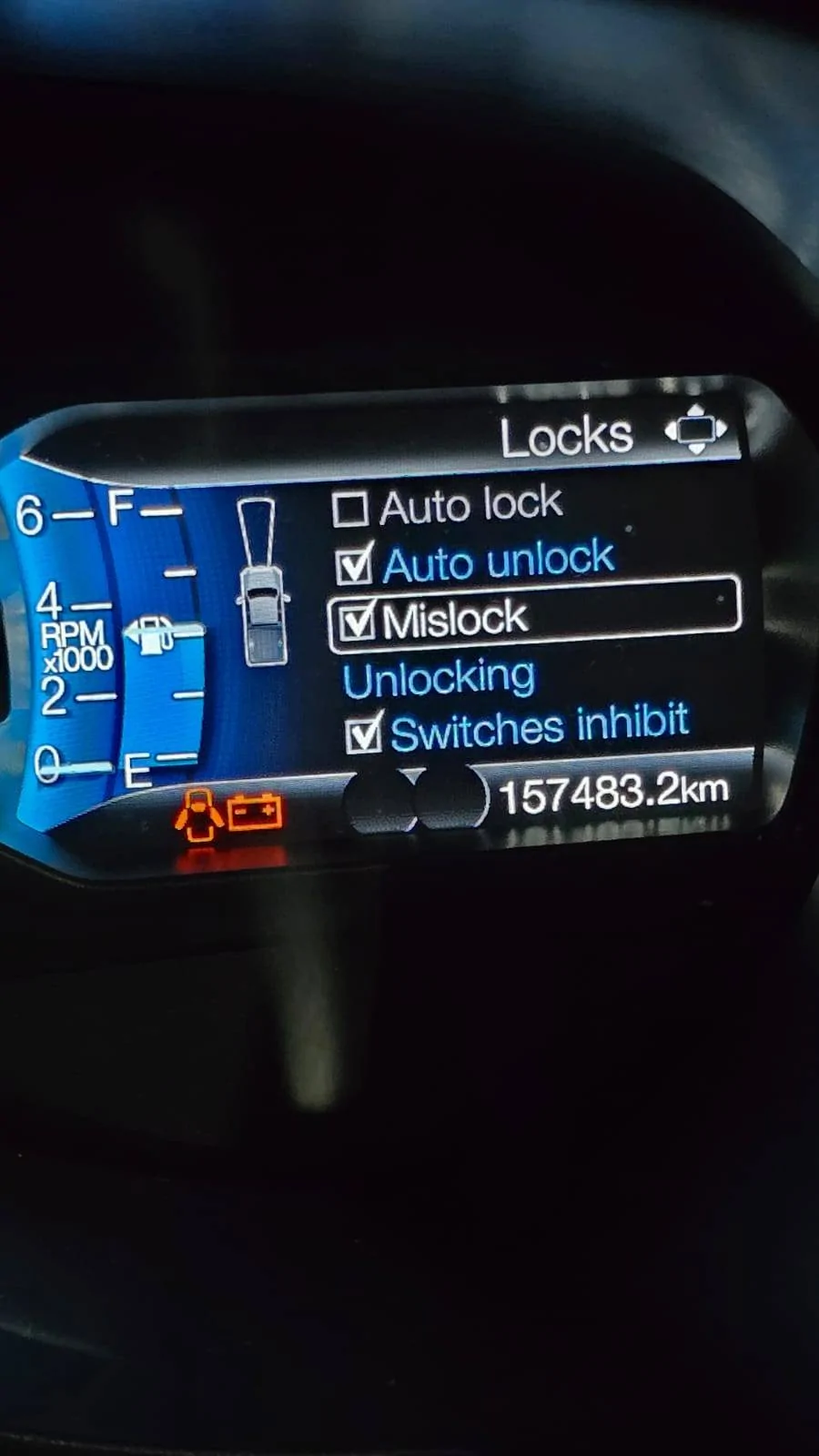
Perhaps The BCM module has a setting for the locks?Hi All,
Not sure if I am doing something wrong but the auto lock on the SYNC3 screen is greyed out. I have enabled auto lock functions in APIM and IPC visa ForScan but it is still greyed out.
Any advise as to why this is still greyed out?
Thanks,
Ed

diesel924
Well-Known Member
- First Name
- Dan
- Joined
- Aug 17, 2020
- Threads
- 0
- Messages
- 158
- Reaction score
- 347
- Location
- Ellington, Connecticut
- Vehicle(s)
- 2019 Ranger Lariat, 2020 Escape
- Occupation
- Fire truck mechanic, EMT
What the hell is Mislock anyway?

airline tech
Well-Known Member
- Joined
- Aug 24, 2022
- Threads
- 28
- Messages
- 4,482
- Reaction score
- 8,551
- Location
- Midwest - KS
- Vehicle(s)
- 2022 Ranger Lariat-Super Crew, Cactus Gray
- Occupation
- Aircraft Tech
It’s not greyed out - it’s white due to the fact it is deselected.
If you use the up arrow on the steering collum and tab up to the - Autolock then press the OK center button , it will put a check mark in the box and the wording will turn blue.
If you use the up arrow on the steering collum and tab up to the - Autolock then press the OK center button , it will put a check mark in the box and the wording will turn blue.
Ederich
Member
- Thread starter
- #7
Thanks for the response but I know I need to use the up and down on the right side of the steering wheel to select it and the I cannot it is greyed out. I can make a small video if you want to see?It’s not greyed out - it’s white due to the fact it is deselected.
If you use the up arrow on the steering collum and tab up to the - Autolock then press the OK center button , it will put a check mark in the box and the wording will turn blue.
airline tech
Well-Known Member
- Joined
- Aug 24, 2022
- Threads
- 28
- Messages
- 4,482
- Reaction score
- 8,551
- Location
- Midwest - KS
- Vehicle(s)
- 2022 Ranger Lariat-Super Crew, Cactus Gray
- Occupation
- Aircraft Tech
Ok, I would backtrack and undo the changes made with Forscan to get it back to factory OE settings
Then do a IPC and BCM self-test reset, if that is no help then do a PCM self-test reset.
I am assuming that it possibly may be greyed out and not selectable may be due to a system fault and there may be a code stored.
If you use the door lock unlock buttons or FOB - do ALL doors physically unlock and lock including the Tailgate (if power lock)?
If yes, then the system may have an input issue for Gear Position and or Speed, inputs for the Auto-Lock to trigger or it's just a module glitch that hopefully a self-test - will reset and clear.
I think it is possible the changes you made (if any) has the system confused and out of sync, so backtrack those and try the resets and note any codes (if any) to pinpoint a path to follow.
Then do a IPC and BCM self-test reset, if that is no help then do a PCM self-test reset.
I am assuming that it possibly may be greyed out and not selectable may be due to a system fault and there may be a code stored.
If you use the door lock unlock buttons or FOB - do ALL doors physically unlock and lock including the Tailgate (if power lock)?
If yes, then the system may have an input issue for Gear Position and or Speed, inputs for the Auto-Lock to trigger or it's just a module glitch that hopefully a self-test - will reset and clear.
I think it is possible the changes you made (if any) has the system confused and out of sync, so backtrack those and try the resets and note any codes (if any) to pinpoint a path to follow.
airline tech
Well-Known Member
- Joined
- Aug 24, 2022
- Threads
- 28
- Messages
- 4,482
- Reaction score
- 8,551
- Location
- Midwest - KS
- Vehicle(s)
- 2022 Ranger Lariat-Super Crew, Cactus Gray
- Occupation
- Aircraft Tech
The only other things I can think of is to try deselecting and reselecting - all the boxes related to the door locks or try this (below) for related door lock programming.
Remote Control
Unlocking the Doors - Two-Stage
Unlock
Press the button to unlock the
driver door.
Press the button again within
three seconds to unlock all doors. The
direction indicators will flash.
With the ignition off, press and hold both
the lock and unlock buttons on the remote
control for three seconds to change
between driver door or all door unlock
mode. The direction indicators will flash
twice to indicate a change to the unlocking
mode. Driver door mode only unlocks the
driver door when you press the unlock
button once. All door mode unlocks all
doors when you press the unlock button
once. The unlocking mode applies to the
remote control and Intelligent Access Key.
Remote Control
Unlocking the Doors - Two-Stage
Unlock
Press the button to unlock the
driver door.
Press the button again within
three seconds to unlock all doors. The
direction indicators will flash.
With the ignition off, press and hold both
the lock and unlock buttons on the remote
control for three seconds to change
between driver door or all door unlock
mode. The direction indicators will flash
twice to indicate a change to the unlocking
mode. Driver door mode only unlocks the
driver door when you press the unlock
button once. All door mode unlocks all
doors when you press the unlock button
once. The unlocking mode applies to the
remote control and Intelligent Access Key.
Ederich
Member
- Thread starter
- #10
thanks for the advise, I reverted all my changes and did the reset test like you recommended but now the Auto lock has completely disappeared like it was before I made changes to APIM and IPC modules. So now I am back to square one again? I probably should have stated that I want the doors to auto lock while driving away as this is not happening.Ok, I would backtrack and undo the changes made with Forscan to get it back to factory OE settings
Then do a IPC and BCM self-test reset, if that is no help then do a PCM self-test reset.
I am assuming that it possibly may be greyed out and not selectable may be due to a system fault and there may be a code stored.
If you use the door lock unlock buttons or FOB - do ALL doors physically unlock and lock including the Tailgate (if power lock)?
If yes, then the system may have an input issue for Gear Position and or Speed, inputs for the Auto-Lock to trigger or it's just a module glitch that hopefully a self-test - will reset and clear.
I think it is possible the changes you made (if any) has the system confused and out of sync, so backtrack those and try the resets and note any codes (if any) to pinpoint a path to follow.
If you have any advise as to what I should check or do next I would appreciate it. Otherwise I would have to ask the ford tech guys to have a look. Might be something that is missing in the configuration files completely that they removed for Australian rangers.
RangerBill
Well-Known Member
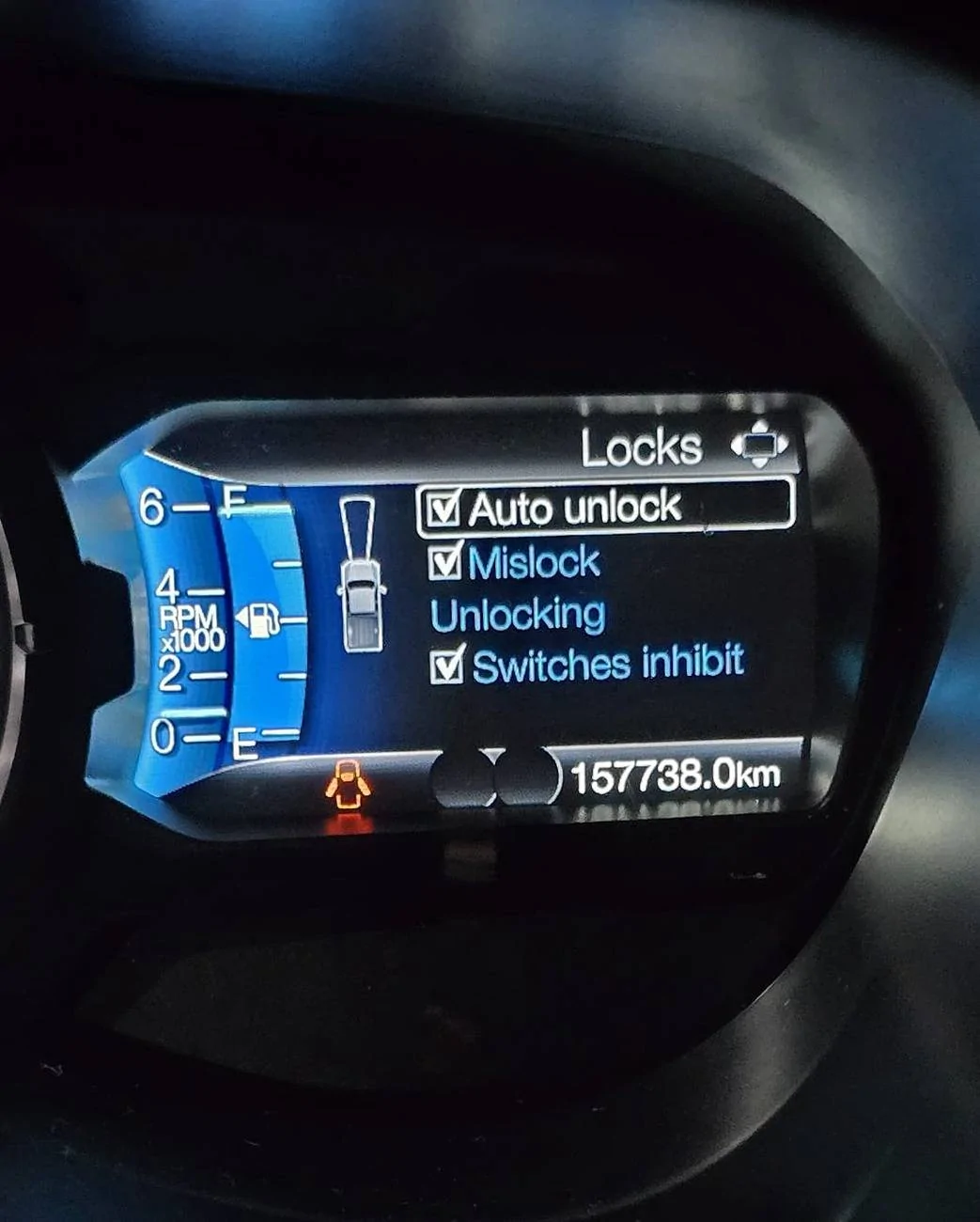
Maybe the selections are mutually exclusive. Try unchecking the other selections for the door locks and then see if you can select auto lock.thanks for the advise, I reverted all my changes and did the reset test like you recommended but now the Auto lock has completely disappeared like it was before I made changes to APIM and IPC modules. So now I am back to square one again? I probably should have stated that I want the doors to auto lock while driving away as this is not happening.
If you have any advise as to what I should check or do next I would appreciate it. Otherwise I would have to ask the ford tech guys to have a look. Might be something that is missing in the configuration files completely that they removed for Australian rangers.

airline tech
Well-Known Member
- Joined
- Aug 24, 2022
- Threads
- 28
- Messages
- 4,482
- Reaction score
- 8,551
- Location
- Midwest - KS
- Vehicle(s)
- 2022 Ranger Lariat-Super Crew, Cactus Gray
- Occupation
- Aircraft Tech
I understand now, for some reason your Ranger is programmed / configured with the option missing and needs Forscan help.
I would focus on the IPC and BCM Modules
The IPC puts it on the display and the BCM enables the control.
I would get your As-Built files and then look at these (2) data lines:
US Version Rangers have these:
BCM:
726-15-01 - 0101-0101-0148
IPC:
720-01-01 - 2FOF-2FOF-7271
These 2 lines contain (Auto-Lock) codes, I suspect your BCM line is set to disable, now without hooking up, I do not know if there is a quick selection method in the BCM or IPC.
If these 2 lines do not match these - post what they are.
BCM - Breakdown of that line
All the (1s) in that line are (ENABLE) so,
x1x1-xxxx-xxxx - Enables Autolock for person 1 & 2
xxxx-x1x1-xxxx - Enables Autolock for Person 3 & 4
xxxx-xxxx-x1xx - Enables Vechicle Autolock
IPC - Breakdown of that line (Autolock) setting only
xxxF-xxxx-xxxx - (F=Enable) of the Autolock menu
Try the above and see if it works, these are the main ones but there may be other settings in the other modules to get it to work, as far I can tell this should at the very least make it a selectable option.
I would focus on the IPC and BCM Modules
The IPC puts it on the display and the BCM enables the control.
I would get your As-Built files and then look at these (2) data lines:
US Version Rangers have these:
BCM:
726-15-01 - 0101-0101-0148
IPC:
720-01-01 - 2FOF-2FOF-7271
These 2 lines contain (Auto-Lock) codes, I suspect your BCM line is set to disable, now without hooking up, I do not know if there is a quick selection method in the BCM or IPC.
If these 2 lines do not match these - post what they are.
BCM - Breakdown of that line
All the (1s) in that line are (ENABLE) so,
x1x1-xxxx-xxxx - Enables Autolock for person 1 & 2
xxxx-x1x1-xxxx - Enables Autolock for Person 3 & 4
xxxx-xxxx-x1xx - Enables Vechicle Autolock
IPC - Breakdown of that line (Autolock) setting only
xxxF-xxxx-xxxx - (F=Enable) of the Autolock menu
Try the above and see if it works, these are the main ones but there may be other settings in the other modules to get it to work, as far I can tell this should at the very least make it a selectable option.
Ederich
Member
- Thread starter
- #13
Thank you very much for the good guidance.I understand now, for some reason your Ranger is programmed / configured with the option missing and needs Forscan help.
I would focus on the IPC and BCM Modules
The IPC puts it on the display and the BCM enables the control.
I would get your As-Built files and then look at these (2) data lines:
US Version Rangers have these:
BCM:
726-15-01 - 0101-0101-0148
IPC:
720-01-01 - 2FOF-2FOF-7271
These 2 lines contain (Auto-Lock) codes, I suspect your BCM line is set to disable, now without hooking up, I do not know if there is a quick selection method in the BCM or IPC.
If these 2 lines do not match these - post what they are.
BCM - Breakdown of that line
All the (1s) in that line are (ENABLE) so,
x1x1-xxxx-xxxx - Enables Autolock for person 1 & 2
xxxx-x1x1-xxxx - Enables Autolock for Person 3 & 4
xxxx-xxxx-x1xx - Enables Vechicle Autolock
IPC - Breakdown of that line (Autolock) setting only
xxxF-xxxx-xxxx - (F=Enable) of the Autolock menu
Try the above and see if it works, these are the main ones but there may be other settings in the other modules to get it to work, as far I can tell this should at the very least make it a selectable option.
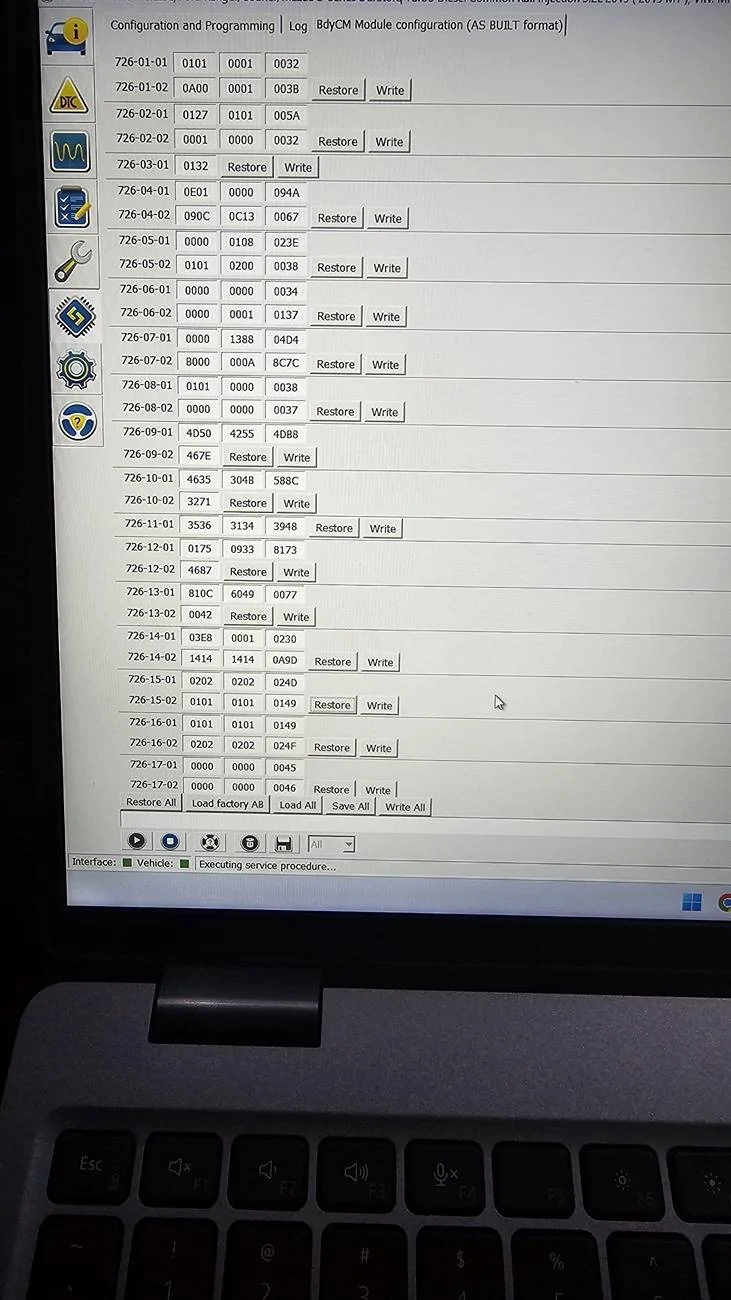
I did manage to find the 2 values you referred to but mine are completely different. I have attached screenshots. I also noticed that I only have BdyCM which I assumed is the same as BCM.
Let me know what you think please.
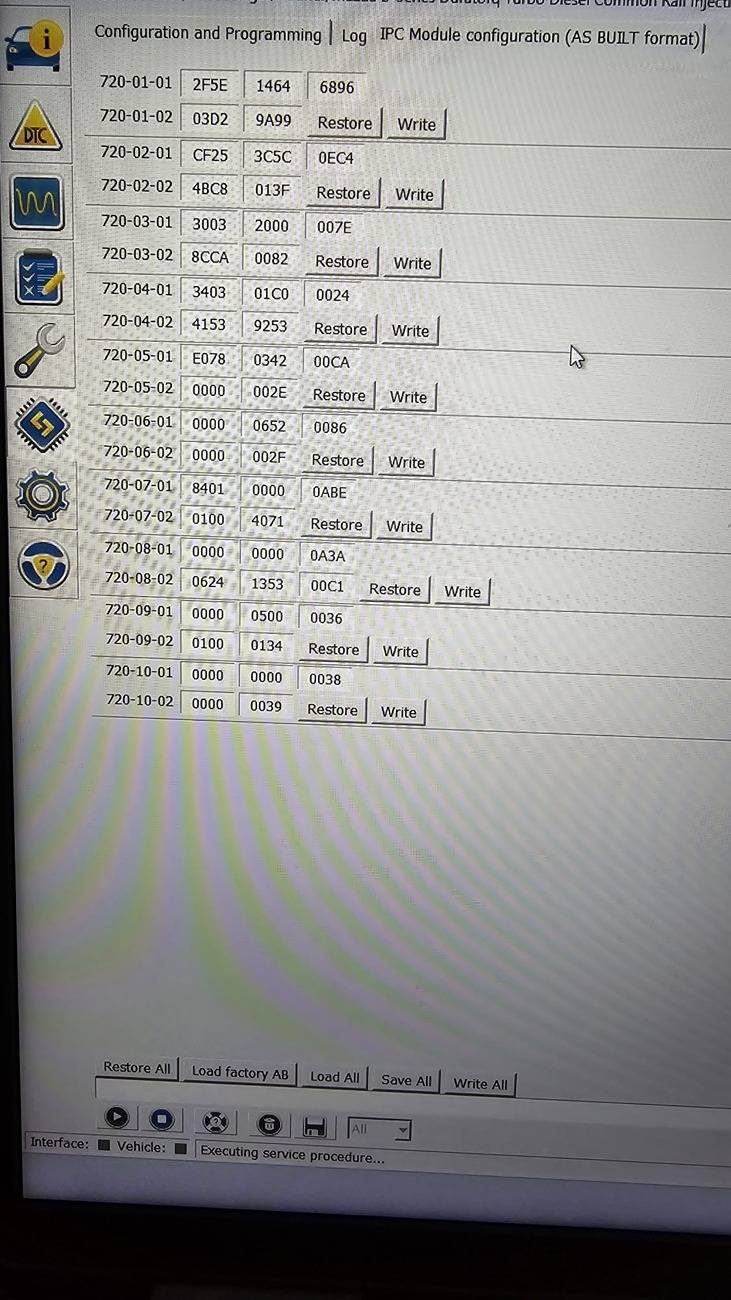
airline tech
Well-Known Member
- Joined
- Aug 24, 2022
- Threads
- 28
- Messages
- 4,482
- Reaction score
- 8,551
- Location
- Midwest - KS
- Vehicle(s)
- 2022 Ranger Lariat-Super Crew, Cactus Gray
- Occupation
- Aircraft Tech
For a Ref:
I am using Cyanlabs - As-Built database files as a reference:
AsBuilt Databases - CyanLabs
But CAUTION, this website is ad supported and you have to be careful not to click on anything that says (Open) or (Download) - it WILL load a browser add on search engine. (GRR)
Once you are on the site and click any of the module databases to view the content of that file.
If a popup (ad) comes up DO NOT click (OPEN) or (Download)
Just click close or the (X) then the popout will disappear and you can safely view the content.
I made that MISTAKE only once and I spent over an hour to get the adware off my laptop.
Now to get your As-Bult data as it came from the factory use this link and type in your VIN#
This site is safe and no stupid adware to deal with
Index - FordServiceInfo.Com (motorcraftservice.com)
US Version Rangers have this for: Now this is for the Auto-Relock settings, this would be if you are driving and auto-lock was engaged and you came to a stop, opened the door with ignition on- then closed the door and started driving - the doors would auto-lock again.
I will say that even though this line is off as compared to the As-Built database breakdowns of the lines - it does reengage the auto-lock.
BCM:
726-15-02 - 0000-0000-0044
Now for the BCM
726-15-01
0=Disabled
1= Enabled
2= Inop
Now for the IPC
720-01-01
F=Enabled
E= Disabled
I am not sure (off-hand) if Forscan will let you make a change to any line - without a Restore or Rewrite the specific line - I am thinking it it may be for that specific block number.
I am assuming you were using the (quick) way with your previous changes you made in the other As Built Forscan link.
You can try that again for the IPC and try to find the same in the BCM as the quick method automatically makes changes to the files (you posted) page.
You can try to manually change the lines from that page and then click (write) and see if it will let you make a change.
so, change - 0202 to 0101 for the BCM line - Its either going to let you make the change or its going to give you an - Error Write message.
I am using Cyanlabs - As-Built database files as a reference:
AsBuilt Databases - CyanLabs
But CAUTION, this website is ad supported and you have to be careful not to click on anything that says (Open) or (Download) - it WILL load a browser add on search engine. (GRR)
Once you are on the site and click any of the module databases to view the content of that file.
If a popup (ad) comes up DO NOT click (OPEN) or (Download)
Just click close or the (X) then the popout will disappear and you can safely view the content.
I made that MISTAKE only once and I spent over an hour to get the adware off my laptop.
Now to get your As-Bult data as it came from the factory use this link and type in your VIN#
This site is safe and no stupid adware to deal with
Index - FordServiceInfo.Com (motorcraftservice.com)
US Version Rangers have this for: Now this is for the Auto-Relock settings, this would be if you are driving and auto-lock was engaged and you came to a stop, opened the door with ignition on- then closed the door and started driving - the doors would auto-lock again.
I will say that even though this line is off as compared to the As-Built database breakdowns of the lines - it does reengage the auto-lock.
BCM:
726-15-02 - 0000-0000-0044
Now for the BCM
726-15-01
0=Disabled
1= Enabled
2= Inop
Now for the IPC
720-01-01
F=Enabled
E= Disabled
I am not sure (off-hand) if Forscan will let you make a change to any line - without a Restore or Rewrite the specific line - I am thinking it it may be for that specific block number.
I am assuming you were using the (quick) way with your previous changes you made in the other As Built Forscan link.
You can try that again for the IPC and try to find the same in the BCM as the quick method automatically makes changes to the files (you posted) page.
You can try to manually change the lines from that page and then click (write) and see if it will let you make a change.
so, change - 0202 to 0101 for the BCM line - Its either going to let you make the change or its going to give you an - Error Write message.
airline tech
Well-Known Member
- Joined
- Aug 24, 2022
- Threads
- 28
- Messages
- 4,482
- Reaction score
- 8,551
- Location
- Midwest - KS
- Vehicle(s)
- 2022 Ranger Lariat-Super Crew, Cactus Gray
- Occupation
- Aircraft Tech
I just noted a MISTAKE I made for the IPC setting (As-Built) I posted
IPC
72-01-01 (US Version Rangers) is
2FOF-3464-7271
Not the (I previously posted)
2FOF-2FOF-7271
IPC
72-01-01 (US Version Rangers) is
2FOF-3464-7271
Not the (I previously posted)
2FOF-2FOF-7271
Sponsored
Last edited:
Similar threads


- Replies
- 17
- Views
- 5,986

- Replies
- 0
- Views
- 924

