
rangerdanger
Well-Known Member
- Joined
- Oct 9, 2018
- Threads
- 194
- Messages
- 3,487
- Reaction score
- 2,659
- Location
- SF Bay Area
- Vehicle(s)
- 2019 Ford Ranger SuperCrew XLT FX4
- Vehicle Showcase
- 1
- Thread starter
- #1
Two methods:
1) Simply double click the "R" forum icon in front of the sub-forum that you'd like to mark as read.
or
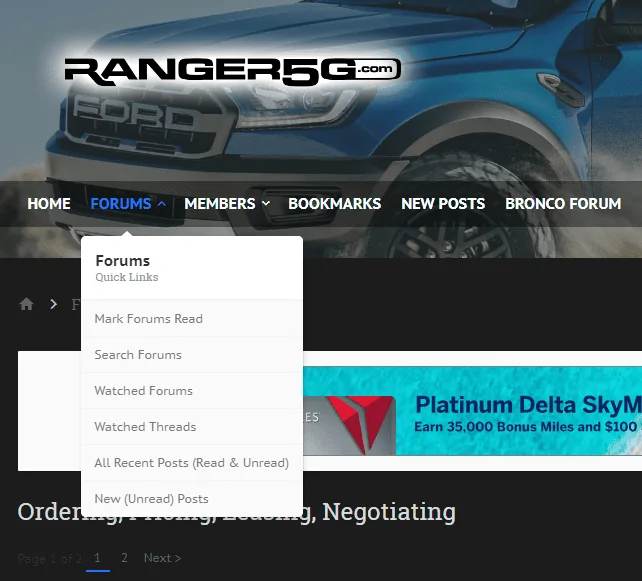
2) If you are browsing the sub-forum that you'd like to mark as read, for example "Ordering, Pricing, Leasing, Negotiating".
Select the FORUM drop down button and select the option that says MARK FORUMS READ.

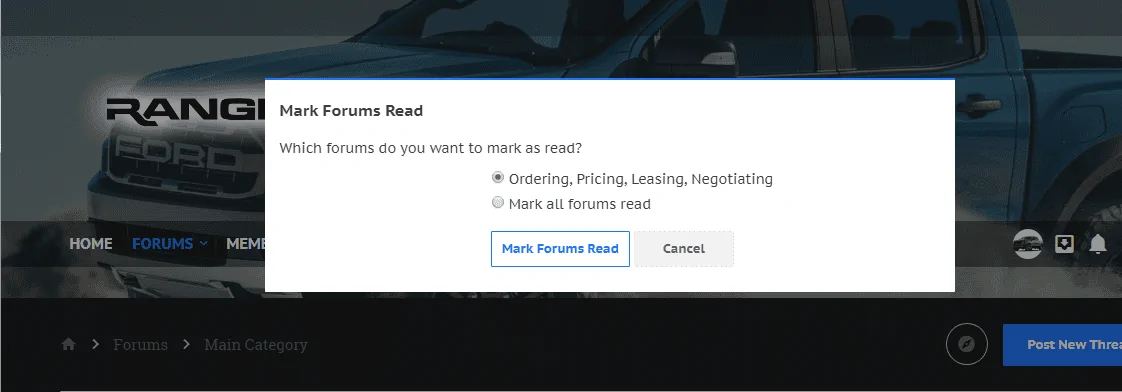
From there you will get a pop-up message asking "Which forums do you want to mark as read?". By default the sub-forum you're currently viewing will be selected. Then hit the MARK FORUMS READ button.

1) Simply double click the "R" forum icon in front of the sub-forum that you'd like to mark as read.
or
2) If you are browsing the sub-forum that you'd like to mark as read, for example "Ordering, Pricing, Leasing, Negotiating".
Select the FORUM drop down button and select the option that says MARK FORUMS READ.
From there you will get a pop-up message asking "Which forums do you want to mark as read?". By default the sub-forum you're currently viewing will be selected. Then hit the MARK FORUMS READ button.
Sponsored