Sponsored

Intelligent access not working at all.

BrianEvens

Active Member
First Name
Brian
Joined
Jan 1, 2020
Threads
5
Messages
35
Reaction score
24
Location
WNY
Vehicle(s)
2019 Ranger
I recently discovered that my Intelligent Access is not working at all. I’m referring to the feature that allows me to lock and/or unlock the truck by touching the handle, as long as I have the fob in my pocket. I’ve read through the forum for similar posts, but they all suggest that it’s the battery, in the truck or in the fob. But I have replaced both the battery in the truck and the battery in the fob, and neither of those fixed the issue. *Side note; I hadn’t bought a new battery in a long time. Holy shit they’re expensive! But I digress, in spite of replacing all the batteries, my Intelligent Access still isn’t working. I’ve read all the posts, watched all the YouTubes, read my manual and still nothing. I dread the thought of going into the dealer, because I’m sure they’re going to say something like, “You just needed to push this button 5 times, push the break pedal a half a time, toss a pinch of salt over your left shoulder and say Beetlejuice TWICE. You idiot.” So I’m hoping someone on here can lead down the path to righteousness. Any suggestions are much appreciated.
Sponsored


 

RangerBill

Well-Known Member
First Name
Bob
Joined
Jun 8, 2022
Threads
3
Messages
1,609
Reaction score
2,132
Location
PA
Vehicle(s)
2019 Ford Ranger Lariat Super Crew FX4
Occupation
retired
I recently discovered that my Intelligent Access is not working at all. I’m referring to the feature that allows me to lock and/or unlock the truck by touching the handle, as long as I have the fob in my pocket. I’ve read through the forum for similar posts, but they all suggest that it’s the battery, in the truck or in the fob. But I have replaced both the battery in the truck and the battery in the fob, and neither of those fixed the issue. *Side note; I hadn’t bought a new battery in a long time. Holy shit they’re expensive! But I digress, in spite of replacing all the batteries, my Intelligent Access still isn’t working. I’ve read all the posts, watched all the YouTubes, read my manual and still nothing. I dread the thought of going into the dealer, because I’m sure they’re going to say something like, “You just needed to push this button 5 times, push the break pedal a half a time, toss a pinch of salt over your left shoulder and say Beetlejuice TWICE. You idiot.” So I’m hoping someone on here can lead down the path to righteousness. Any suggestions are much appreciated.
Have you tried another key fob? Using a scanner such as Forscan, are there any DTC codes?
 

RangerBill

Well-Known Member
First Name
Bob
Joined
Jun 8, 2022
Threads
3
Messages
1,609
Reaction score
2,132
Location
PA
Vehicle(s)
2019 Ford Ranger Lariat Super Crew FX4
Occupation
retired
Did you reset the BMS (battery monitoring system) when you replaced the vehicle battery? This lets the vehicle know that a new battery has been installed.

The Intelligent Access door handles are known to stop working with a bad or discharged vehicle battery.
 
Last edited:
OP
OP
BrianEvens

BrianEvens

Active Member
First Name
Brian
Joined
Jan 1, 2020
Threads
5
Messages
35
Reaction score
24
Location
WNY
Vehicle(s)
2019 Ranger
Did you reset the BMS (battery monitoring system) when you replaced the vehicle battery? This lets the vehicle know that a new battery has been installed.

The Intelligent Access door handles are known to stop working with a bad or discharged vehicle battery.
I did try my other fob, and it didn’t work either.
I don’t even know what the BMS is, much less how to reset it. My local garage replaced the battery, so I don’t know if they reset the BMS or not. How do you reset it?
 
OP
OP
BrianEvens

BrianEvens

Active Member
First Name
Brian
Joined
Jan 1, 2020
Threads
5
Messages
35
Reaction score
24
Location
WNY
Vehicle(s)
2019 Ranger
Did you reset the BMS (battery monitoring system) when you replaced the vehicle battery? This lets the vehicle know that a new battery has been installed.

The Intelligent Access door handles are known to stop working with a bad or discharged vehicle battery.

I googled the BMS reset steps and I’ll try it in the morning. Thanks for the heads up!


airline tech

Well-Known Member
Joined
Aug 24, 2022
Threads
28
Messages
4,458
Reaction score
8,520
Location
Midwest - KS
Vehicle(s)
2022 Ranger Lariat-Super Crew, Cactus Gray
Occupation
Aircraft Tech
Just to confirm - Both Left & Right Handles are inop - Unlock & Lock?
But operates normally via FOB Buttons and Interior Door Buttons?

If you have a scanner or Forscan - You can do the BMS Reset with the scanner.
You should also have a code logged in the BCM -That code will help pinpoint the issue.
Plus using the scan tool - Run a BCM / PATS / RTM (Self-Test) Reset on all 3 modules.

I suspect one of the handles is faulted and its pulling down the circuit (internal to the BCM) micro controller as a possibility or a bad ground.

The circuit uses a separate power feed and antenna for each handle however they share 1 ground. There is no fuse for this as its direct power from the BCM itself.

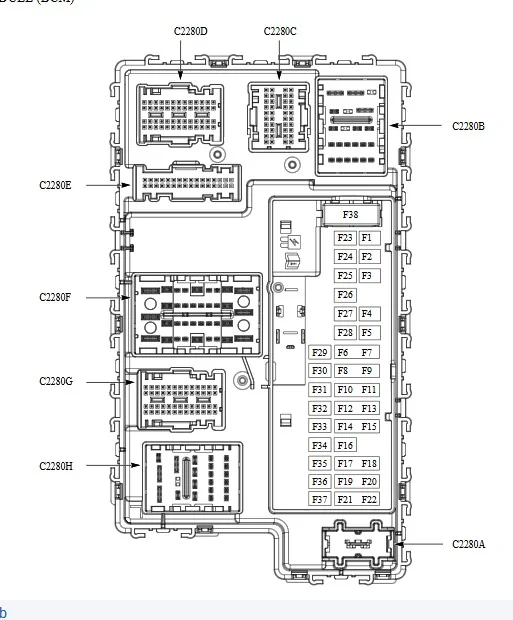
The main connector feed into the BCM for both handles and the ground is C2280E.
Try pulling and reseating this connector and inspect for corroded pins.

BCM Fuse Panel.webp


Operation Note:

Passive Entry

When the BCM detects a lock or unlock sensor is touched on an exterior driver or passenger front door handle it activates the low frequency antenna in the corresponding exterior door handle. The low frequency antenna sends out a signal to activate the passive key. The passive key then responds by sending a high frequency signal back to the RTM . The RTM interprets the high frequency signal from the passive key and sends the information to the BCM . If the BCM detects a valid programmed passive key, the BCM unlocks the driver door, unlocks or locks the driver and passenger doors and tailgate.

Things to also try:

Use the key blade in the Driver's door and use it to cycle the (power locks) Lock & Unlock
Go through the IPC Menu screen - Locks and uncheck all options, cycle the PB Start switch to off and repower and then go back in to the IPC and reselect all options to where you had them set.

There is also a (backup) Lock / Unlock in the front door jambs Black Plastic (Slot) its intended to fit the end of the key blade but I would use a flat tip screwdriver, you may try cycling that as well.

Depending on how deep you want to go without a true T-Shoot and possibly isolate which side (Left or Right) the issue is on, would be pulling the door panels and disconnect the handle connector and see if the opposite side now works, you can move farther downstream to a more accessible connector but disconnecting that will take out the door locks with it
and those are C214 (Left Side) and C3050 (Right Side) located in the kick panels.
If I were to flip a coin I would guess the issue is in the most used handle (Drivers) if it turns out to be a faulty handle.


We can dive into a deeper T-Shoot of the wiring if needed but the above suggestions as well as the BMS Reset may resolve the issue and the deeper dive into the T-Shoot may require removing the door panels
The BMS Reset is important as the BMS system may still have it locked out (power) Load Shed
The Code Scan is important as if the BCM has a code locked (circuit issue) it may have the circuit disabled.
 

hookem57

Well-Known Member
First Name
Don
Joined
Sep 2, 2022
Threads
7
Messages
191
Reaction score
356
Location
Fort Worth
Vehicle(s)
2021 Ranger Tremor
Occupation
Driver
Just to confirm - Both Left & Right Handles are inop - Unlock & Lock?
But operates normally via FOB Buttons and Interior Door Buttons?

If you have a scanner or Forscan - You can do the BMS Reset with the scanner.
You should also have a code logged in the BCM -That code will help pinpoint the issue.
Plus using the scan tool - Run a BCM / PATS / RTM (Self-Test) Reset on all 3 modules.

I suspect one of the handles is faulted and its pulling down the circuit (internal to the BCM) micro controller as a possibility or a bad ground.

The circuit uses a separate power feed and antenna for each handle however they share 1 ground. There is no fuse for this as its direct power from the BCM itself.

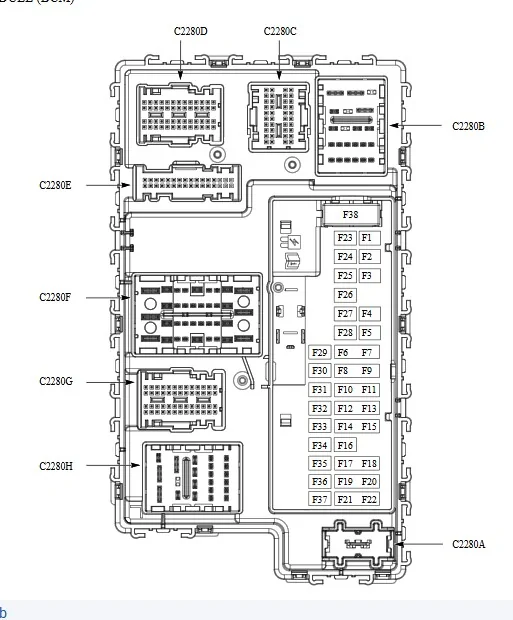
The main connector feed into the BCM for both handles and the ground is C2280E.
Try pulling and reseating this connector and inspect for corroded pins.

BCM Fuse Panel.webp


Operation Note:

Passive Entry

When the BCM detects a lock or unlock sensor is touched on an exterior driver or passenger front door handle it activates the low frequency antenna in the corresponding exterior door handle. The low frequency antenna sends out a signal to activate the passive key. The passive key then responds by sending a high frequency signal back to the RTM . The RTM interprets the high frequency signal from the passive key and sends the information to the BCM . If the BCM detects a valid programmed passive key, the BCM unlocks the driver door, unlocks or locks the driver and passenger doors and tailgate.

Things to also try:

Use the key blade in the Driver's door and use it to cycle the (power locks) Lock & Unlock
Go through the IPC Menu screen - Locks and uncheck all options, cycle the PB Start switch to off and repower and then go back in to the IPC and reselect all options to where you had them set.

There is also a (backup) Lock / Unlock in the front door jambs Black Plastic (Slot) its intended to fit the end of the key blade but I would use a flat tip screwdriver, you may try cycling that as well.

Depending on how deep you want to go without a true T-Shoot and possibly isolate which side (Left or Right) the issue is on, would be pulling the door panels and disconnect the handle connector and see if the opposite side now works, you can move farther downstream to a more accessible connector but disconnecting that will take out the door locks with it
and those are C214 (Left Side) and C3050 (Right Side) located in the kick panels.
If I were to flip a coin I would guess the issue is in the most used handle (Drivers) if it turns out to be a faulty handle.


We can dive into a deeper T-Shoot of the wiring if needed but the above suggestions as well as the BMS Reset may resolve the issue and the deeper dive into the T-Shoot may require removing the door panels
The BMS Reset is important as the BMS system may still have it locked out (power) Load Shed
The Code Scan is important as if the BCM has a code locked (circuit issue) it may have the circuit disabled.
Very informative.
 
OP
OP
BrianEvens

BrianEvens

Active Member
First Name
Brian
Joined
Jan 1, 2020
Threads
5
Messages
35
Reaction score
24
Location
WNY
Vehicle(s)
2019 Ranger
Just to confirm - Both Left & Right Handles are inop - Unlock & Lock?
But operates normally via FOB Buttons and Interior Door Buttons?

If you have a scanner or Forscan - You can do the BMS Reset with the scanner.
You should also have a code logged in the BCM -That code will help pinpoint the issue.
Plus using the scan tool - Run a BCM / PATS / RTM (Self-Test) Reset on all 3 modules.

I suspect one of the handles is faulted and its pulling down the circuit (internal to the BCM) micro controller as a possibility or a bad ground.

The circuit uses a separate power feed and antenna for each handle however they share 1 ground. There is no fuse for this as its direct power from the BCM itself.

The main connector feed into the BCM for both handles and the ground is C2280E.
Try pulling and reseating this connector and inspect for corroded pins.

BCM Fuse Panel.jpeg


Operation Note:

Passive Entry

When the BCM detects a lock or unlock sensor is touched on an exterior driver or passenger front door handle it activates the low frequency antenna in the corresponding exterior door handle. The low frequency antenna sends out a signal to activate the passive key. The passive key then responds by sending a high frequency signal back to the RTM . The RTM interprets the high frequency signal from the passive key and sends the information to the BCM . If the BCM detects a valid programmed passive key, the BCM unlocks the driver door, unlocks or locks the driver and passenger doors and tailgate.

Things to also try:

Use the key blade in the Driver's door and use it to cycle the (power locks) Lock & Unlock
Go through the IPC Menu screen - Locks and uncheck all options, cycle the PB Start switch to off and repower and then go back in to the IPC and reselect all options to where you had them set.

There is also a (backup) Lock / Unlock in the front door jambs Black Plastic (Slot) its intended to fit the end of the key blade but I would use a flat tip screwdriver, you may try cycling that as well.

Depending on how deep you want to go without a true T-Shoot and possibly isolate which side (Left or Right) the issue is on, would be pulling the door panels and disconnect the handle connector and see if the opposite side now works, you can move farther downstream to a more accessible connector but disconnecting that will take out the door locks with it
and those are C214 (Left Side) and C3050 (Right Side) located in the kick panels.
If I were to flip a coin I would guess the issue is in the most used handle (Drivers) if it turns out to be a faulty handle.


We can dive into a deeper T-Shoot of the wiring if needed but the above suggestions as well as the BMS Reset may resolve the issue and the deeper dive into the T-Shoot may require removing the door panels
The BMS Reset is important as the BMS system may still have it locked out (power) Load Shed
The Code Scan is important as if the BCM has a code locked (circuit issue) it may have the circuit disabled.
I successfully did the BCM reset yesterday with the high beam/brake peddle trick. I also discovered that the passenger side front and back door DO function with the intelligent access, while the driver side front and back DO NOT function.
 
OP
OP
BrianEvens

BrianEvens

Active Member
First Name
Brian
Joined
Jan 1, 2020
Threads
5
Messages
35
Reaction score
24
Location
WNY
Vehicle(s)
2019 Ranger
I successfully did the BCM reset yesterday with the high beam/brake peddle trick. I also discovered that the passenger side front and back door DO function with the intelligent access, while the driver side front and back DO NOT function.
Where is that “fuse box” located? I’ll try the reseat thing.
 

airline tech

Well-Known Member
Joined
Aug 24, 2022
Threads
28
Messages
4,458
Reaction score
8,520
Location
Midwest - KS
Vehicle(s)
2022 Ranger Lariat-Super Crew, Cactus Gray
Occupation
Aircraft Tech
The Rear Door Handles do not have the (sensors) only the Front Handles have them at least on my 2022, I cannot recall if the Rears had them at some point and were deleted.
Since the Passenger Side is working then most likely the Drivers Handle (Internal Antenna) is bad.
It will most likely have a code in the BCM and a simple clear of the code may get it working, but you will need a scan tool to do it.

It does make it simpler to T/Shoot though and you can try to pull and reseat a few connectors on the off chance its just a dirty connection. But I have a hunch the Handle is bad.

The BCM is located in the Drivers Footwell just above your feet
The main connector to reseat is C2280E

1754315337307-tk.webp


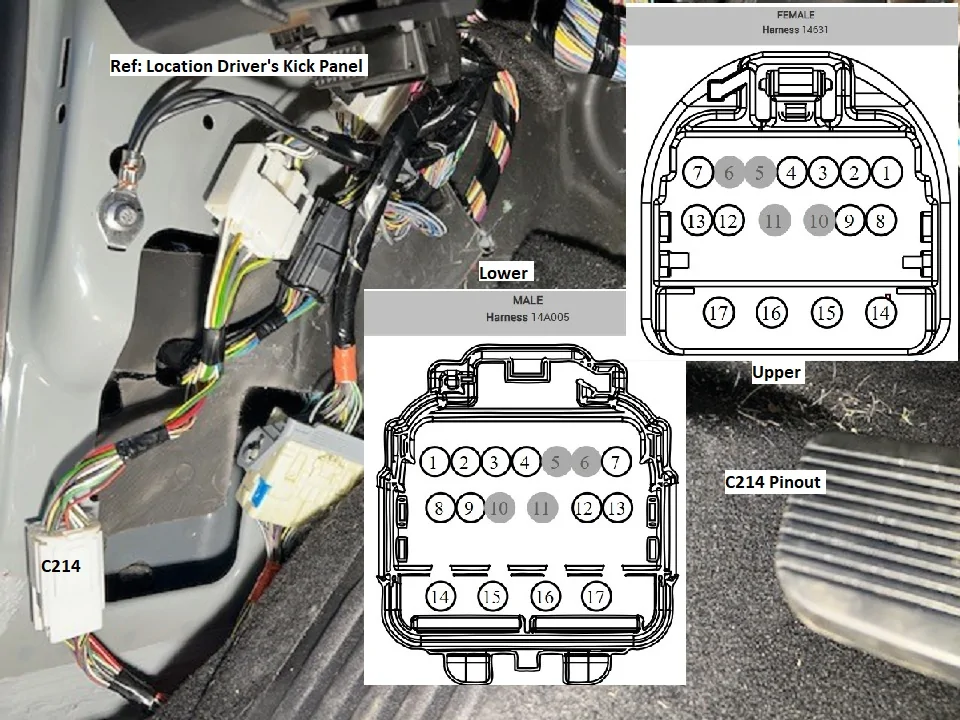
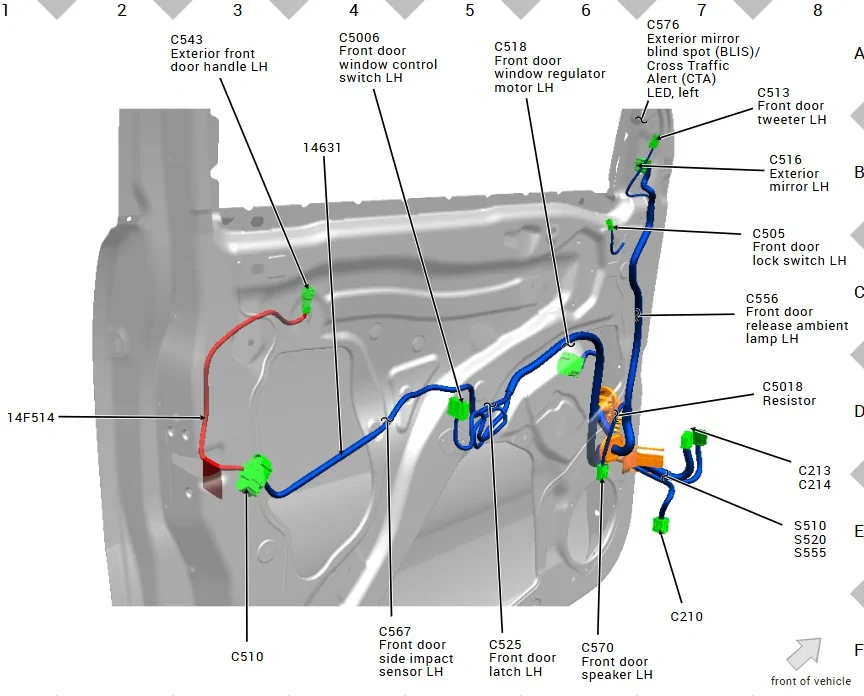
Next Connector is: C214 - This feeds into the door - the kick panel has to be removed for access

C214 Detailed.webp


Then C510 - The door panel has to be removed for access
Then C543


LF Door Wiring.webp


This would be a simple check with a scanner but Old School we can swap the Right Handle to the Left to see if it the Right Handle will function in the Left Position.
or dig into wiring checks with a meter
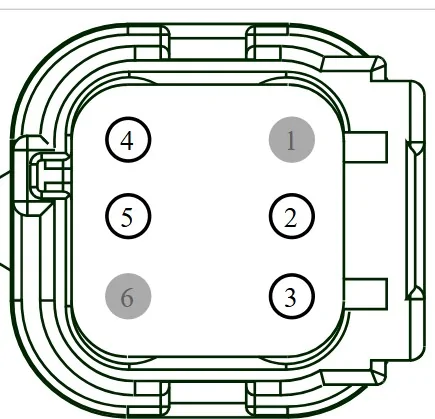
The basic checks @ C543 are

Key Off:
Check for Power @ Pin #3 (Battery Voltage) 12 Volts

Ohms Scale:
Check the Ground Pin # 4 to body ground -Less than 3 ohms

If you have good power and ground then we move to the Antenna, the antenna is internal to the handle

Ohms Scale:
Check the resistance of the handle antenna:
Handle Side of the connector - Not the Harness Side so visually match C543 to the handle connector to find the pins.

Probe between Pins 2 & 5 - 1 to 3 ohms - I have a feeling you may have high resistance here

We can go a step deeper and check the continuity between the BCM and C543 for the Antenna wiring if needed but if the above checks are good its a good indication the handle is bad.
If you find you have no power then it is possible the BCM has dropped power to it and needs the code reset.

C543 (Handle Connector)

C543.webp
 

airline tech

Well-Known Member
Joined
Aug 24, 2022
Threads
28
Messages
4,458
Reaction score
8,520
Location
Midwest - KS
Vehicle(s)
2022 Ranger Lariat-Super Crew, Cactus Gray
Occupation
Aircraft Tech
Ok, I did some digging and looked at the diagram for a 4-Door system (keyless entry) I found for the 2020.
The Left Front Handle has the Antenna / Touch Sensors and the Left Rear only has the Touch Sensor.

Separate Power Feeds to each handle and the Ground is shared by all 4 Handles, so the most logical is the Left Front Handle (Internal Antenna) is bad or the BCM has coded it and its blocking operation as the Left Rear Handle uses the Left Front Handle (Antenna) - this would explain why both Left Side Handles are inop.
Ditto - Operation for the Right Side
 
OP
OP
BrianEvens

BrianEvens

Active Member
First Name
Brian
Joined
Jan 1, 2020
Threads
5
Messages
35
Reaction score
24
Location
WNY
Vehicle(s)
2019 Ranger
Ok, I did some digging and looked at the diagram for a 4-Door system (keyless entry) I found for the 2020.
The Left Front Handle has the Antenna / Touch Sensors and the Left Rear only has the Touch Sensor.

Separate Power Feeds to each handle and the Ground is shared by all 4 Handles, so the most logical is the Left Front Handle (Internal Antenna) is bad or the BCM has coded it and its blocking operation as the Left Rear Handle uses the Left Front Handle (Antenna) - this would explain why both Left Side Handles are inop.
Ditto - Operation for the Right Side
Dude! You're awesome! I'm going to have my local garage do the scan thing and see if he can sort anything out.
Sponsored


Top