Sponsored

Help with ForScan

First Name
Terry
Joined
Sep 20, 2025
Threads
2
Messages
5
Reaction score
0
Location
pa
Vehicle(s)
2019 Ranger
Occupation
electrician
So i have the forscan program and the adaptor and i can connect to my 2019 xlt but i am not seeing some of the modules i see other folks talking about. what am i doing wrong
Sponsored


 

airline tech

Well-Known Member
Joined
Aug 24, 2022
Threads
28
Messages
4,458
Reaction score
8,520
Location
Midwest - KS
Vehicle(s)
2022 Ranger Lariat-Super Crew, Cactus Gray
Occupation
Aircraft Tech
What adapter are you using? And what modules are you seeing or not seeing?
 
OP
OP
First Name
Terry
Joined
Sep 20, 2025
Threads
2
Messages
5
Reaction score
0
Location
pa
Vehicle(s)
2019 Ranger
Occupation
electrician
What adapter are you using? And what modules are you seeing or not seeing?
I am using the elm327 usb the only modules I see are the
Bdycm
Pcm
Bcm
Dcdc
And like one more that I can't remember off the top of my head.

All total I see about 6 or 7 modules.
 

airline tech

Well-Known Member
Joined
Aug 24, 2022
Threads
28
Messages
4,458
Reaction score
8,520
Location
Midwest - KS
Vehicle(s)
2022 Ranger Lariat-Super Crew, Cactus Gray
Occupation
Aircraft Tech
I think you have the older adapter and when Forscan is loading it has you move the toggle switch on the adapter - to get it to load all the modules. (HS or MS)

You may try loading a (new) profile as well, I have not used the (switch) version as it's an outdated adapter, the newer versions auto switch and load all the modules, so pay attention to the pop-up message when Forscan is connecting and loading, it requires you to move the toggle switch.

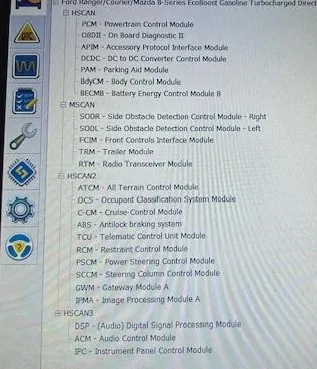
Here is a full list of the modules you should see.
The Ranger does not have the (Bdycm) we only have the BCM


Can Bus Quick Ref Pic.webp
 
OP
OP
First Name
Terry
Joined
Sep 20, 2025
Threads
2
Messages
5
Reaction score
0
Location
pa
Vehicle(s)
2019 Ranger
Occupation
electrician
I think you have the older adapter and when Forscan is loading it has you move the toggle switch on the adapter - to get it to load all the modules. (HS or MS)

You may try loading a (new) profile as well, I have not used the (switch) version as it's an outdated adapter, the newer versions auto switch and load all the modules, so pay attention to the pop-up message when Forscan is connecting and loading, it requires you to move the toggle switch.

Here is a full list of the modules you should see.
The Ranger does not have the (Bdycm) we only have the BCM

Can Bus Quick Ref Pic.webp
ty I only see the first hscan list and not the others for some reason


OP
OP
First Name
Terry
Joined
Sep 20, 2025
Threads
2
Messages
5
Reaction score
0
Location
pa
Vehicle(s)
2019 Ranger
Occupation
electrician
ok, so i got everything else i wanted done but I still cannot find the setting to change the number of flashes on the one touch turn signal for lane changing. any help would be appreciated
 

RangerBill

Well-Known Member
First Name
Bob
Joined
Jun 8, 2022
Threads
3
Messages
1,609
Reaction score
2,132
Location
PA
Vehicle(s)
2019 Ford Ranger Lariat Super Crew FX4
Occupation
retired
ok, so i got everything else i wanted done but I still cannot find the setting to change the number of flashes on the one touch turn signal for lane changing. any help would be appreciated

That cannot be changed in the Ranger. It only applies to the F150.
 

airline tech

Well-Known Member
Joined
Aug 24, 2022
Threads
28
Messages
4,458
Reaction score
8,520
Location
Midwest - KS
Vehicle(s)
2022 Ranger Lariat-Super Crew, Cactus Gray
Occupation
Aircraft Tech
ok, so i got everything else i wanted done but I still cannot find the setting to change the number of flashes on the one touch turn signal for lane changing. any help would be appreciated
This is one of the (change options) I never really dove deep into and I don't remember if anybody has actually tried to change this as this will most likely be a manual change (write)
for the following reason:
First Note:
This is the Ranger Factory Line: All Ranger Trims are set to this:
724-01-01: - 5064-600E-004F

Now note: the SCCM (Steering Colum Control Module)
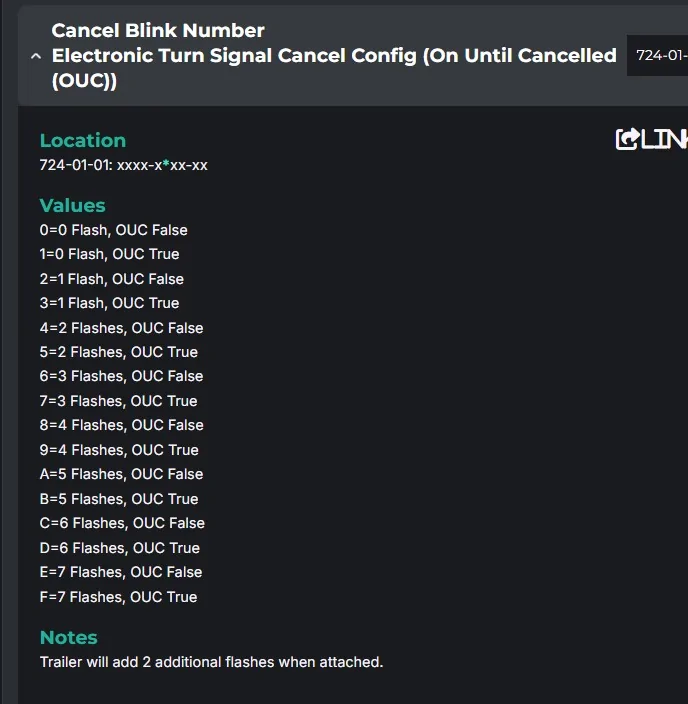
As-Bult Database Breakdown for the (Turn Signal Blinks - Cancel)

So, per the As-Built breakdown the Ranger is set to (0)
which would indicate (0) Flash / OUC False

We know that this is (INCORRECT) as we have a factory setting of (3 -Flashes & OUC- False)

So as long as (If this is the actual Hex Address) for the Cancel Blink Number then it's just a matter of Trial & Error to play with the (Number or Letter) to find the outcome you are wanting for example (A).

However - NOTE: That you want to use any of the ones that have (OUC-FALSE)
Reason - On Until Cancelled - ties into regular use of the turn signal (full click engagement) if you leave this set to (TRUE) the turn signal will not auto cancel as normal, you will have tap the turn stalk to turn it off.

There have been reports of this not working on the Ranger, but I do not know for sure if anybody has actually gone through the below settings and tried it.

Just remember this As-Built database does not match up to what we have - so its Trail & Error to find the correct (Hex) for the outcome you seek.
Example: We Have (0) so (0=3 Flashes & OUC False) and you would need to go through the list and try each one other than (0) to find the correct hex that will provide 5 flashes or 6 flashes and keep in mind to test the (auto - cancel) of the turn signal stalk to ensure the setting is (false)

If I get some time I may hook up and give it a try, as I do not recall trying this yet.

Turn Signal Blinks.webp
 
Last edited:

Big Blue

Well-Known Member
First Name
Lee
Joined
May 5, 2020
Threads
16
Messages
3,927
Reaction score
9,352
Location
Wisconsin
Vehicle(s)
2019 Ford Ranger XLT FX4 Supercrew lighting blue
Occupation
Retired mechanical designer
This has been a quest since the ranger came back in 2019. Hasn't been solved yet.
Also, notice the note at the bottom of the list of options. The ranger does not add any flashes when a trailer is connected. I suspect for some reason Ford decided to hard code the three flashes into the rangers firmware, or changed the memory location.
 

airline tech

Well-Known Member
Joined
Aug 24, 2022
Threads
28
Messages
4,458
Reaction score
8,520
Location
Midwest - KS
Vehicle(s)
2022 Ranger Lariat-Super Crew, Cactus Gray
Occupation
Aircraft Tech
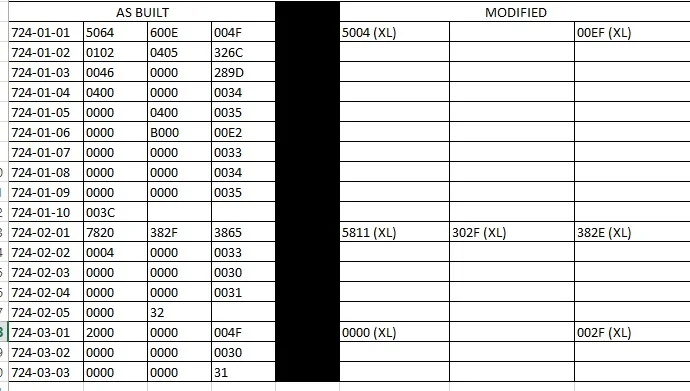
Ok, Once I started digging into this, I now remember hitting this module and (?) our As-Built files over the various known and published files.

Ref: My As-Built Compare Spreadsheet for varied trims:
Note: 724-01-01 through 724-01-10
724-01-02 the 724-01-10 are not normal files like other models in the published spreadsheets or As-Built databases.

I did hook up and try the well-known 724-01-01 - xxxx-xAxx-xxxx
It does not have any effect on the Turn's

So yes, the module address has moved and it's just a matter of finding where it is.
The Turn Signal Switch Status - Still originates from this module and I feel it's still in here.
However, the (code) is different than all postings for (change to)
I have a hunch it is now a (seconds) time setting over a (number of flashes/clicks)

I am finding it difficult to get a true breakdown of this module as it is not a widely published breakdown.
So, it will need a DEEP DARK WEB search to find the missing and unknown information and or go through the data and alter each (hex) to see if it changes anything.
My first thoughts would be to change anything with a 3 or 4 (for seconds)
Remember the last (2) of any line is the Checksum, so it's not in there.


Ranger SCCM As-Built.webp
Sponsored


Top