Sponsored

Updated Findings for Lariat Headlight Swap

OP
OP
airline tech

airline tech

Well-Known Member
Joined
Aug 24, 2022
Threads
28
Messages
4,458
Reaction score
8,520
Location
Midwest - KS
Vehicle(s)
2022 Ranger Lariat-Super Crew, Cactus Gray
Occupation
Aircraft Tech
Just some info from a member that was making changes in FORSCAN before the easy configuration menus were a thing. In the As-Built HEX lines the last two characters in each line are the check-sums for that line and will update automatically. doesn't matter how many character in line, always last two. Also each as-built line may control multiple features. This is seen, if you dig into the F150 spreadsheet. Lastly the easy configuration menus will make required changes to multiple as-built HEX codes with one selection.

As far as the "Allowed DRL Options" selection. When I changed my '19 XLT to use my fog lights as DRLs, I simple changed that selection to "All Options" and have had no issues. As I do not have a Lariat I do not Know why it is set to the HEX value you found. Other than the HEX number 1000 is equivalent to the decimal 16. Other than being one more than 15 it does not appear to be a valid option in Forscan at least.

As far as the "10" in the as-built line 726-50-01, I have no idea what it does, but it evidentially needed to change for this to work.

You are correct the as-built values are the important ones as they are what is written back to the module. The configuration files are just there to make it easier to manipulate the as-built files.

Something I cannot stress enough, is anyone using Forscan should first make backups of all of their as-built files before making any changes. This makes it very easy to reverse any changes that do not work or are not to your liking. intermediate backups also help so you don't have to start from scratch if a later change doesn't work.

Sorry for the long post, but had to clear up the checksum issue. Good work on doing the as-built comparisons to hopefully put this issue to bed. trying to decipher the as-built file ahs driven a a few of us to drink for some time. still looking for what to change to increase the lane change flashes.:LOL:
It was my understanding that it was the last 4, but after checking it is only the last 2. But I'm still learning.
I just was noting that the that Hex Line should change automatically and should not have to be manually altered. (726-50-01)

The above settings are to set it to Factory (As-Built) for the trucks that came with LED headlamps and you are swapping from Halo to Factory LED. I am not (100%) positive that these settings work for all aftermarket, since aftermarket uses different forms of lighting on the DRL's, they are all not an exact copy of factory. Plus, the settings are (NOT) including any (ADD) to the DRL LED strip.


Since I switched from Halo to LED, this DRL Option screen may still be altered to use a different setting, so for owners that still have Halo's and want to (ADD) an extra lighting option to the factory (Lo-Beam) such as Fogs
or
Factory LED and want to (ADD) extra lighting to the factory LED strip

and the current poster (JPrime84) has both lines set to (Dedicated DRL), this is what is generating a BCM trouble code, and by changing the DRL option to (Incorrect Value or Not Configured) he will be telling the truck that there is not any (Addition) additional lighting he wants to include with the DRL strip. The important words in that are (Not Configured), now if he wants to add Fogs etc, this is where to do it.

The problems arise when other owners have swapped to aftermarket headlamp housings and have an extra wire harness tapped into the factory harness, sorry can't remember the brand that does this, then you have to play with the settings some to find the correct setting that the truck likes. (I think it was Alpha Rex) or similar to that.
Sponsored


 

jprime84

Member
Joined
Mar 1, 2023
Threads
2
Messages
13
Reaction score
50
Location
Apex, NC
Vehicle(s)
2023 Ranger XLT
I did notice the "incorrect value" showing in the list after looking at the easy mode UI AFTER setting the values manually this morning. Looking good now I believe.

I swapped my lights almost as soon as I got the truck, seem to be working fine (no weird CEL's) but then again I don't see them from the outside when I'm driving lol. Few times I've used the headlights they seem fine (and properly adjusted surprisingly lol) and the DRL's come on when I unlock the truck and I get no hyper flash with the turns. I did just order the cable though from Amazon and I'll make the changes posted as I don't want any future issues.
As airline tech said, you can check it out in neutral with the parking brake on. Even when mine were unhappy as DRLs on the wrong setting, the headlights worked normal and so did the approach lamps. If you made no forscan changes, then you are probably still using your low beams as DRLs and not the strip.
 

Big Blue

Well-Known Member
First Name
Lee
Joined
May 5, 2020
Threads
16
Messages
3,927
Reaction score
9,352
Location
Wisconsin
Vehicle(s)
2019 Ford Ranger XLT FX4 Supercrew lighting blue
Occupation
Retired mechanical designer
It was my understanding that it was the last 4, but after checking it is only the last 2. But I'm still learning.
I just was noting that the that Hex Line should change automatically and should not have to be manually altered. (726-50-01)

The above settings are to set it to Factory (As-Built) for the trucks that came with LED headlamps and you are swapping from Halo to Factory LED. I am not (100%) positive that these settings work for all aftermarket, since aftermarket uses different forms of lighting on the DRL's, they are all not an exact copy of factory. Plus, the settings are (NOT) including any (ADD) to the DRL LED strip.


Since I switched from Halo to LED, this DRL Option screen may still be altered to use a different setting, so for owners that still have Halo's and want to (ADD) an extra lighting option to the factory (Lo-Beam) such as Fogs
or
Factory LED and want to (ADD) extra lighting to the factory LED strip

and the current poster (JPrime84) has both lines set to (Dedicated DRL), this is what is generating a BCM trouble code, and by changing the DRL option to (Incorrect Value or Not Configured) he will be telling the truck that there is not any (Addition) additional lighting he wants to include with the DRL strip. The important words in that are (Not Configured), now if he wants to add Fogs etc, this is where to do it.

The problems arise when other owners have swapped to aftermarket headlamp housings and have an extra wire harness tapped into the factory harness, sorry can't remember the brand that does this, then you have to play with the settings some to find the correct setting that the truck likes. (I think it was Alpha Rex) or similar to that.
The "Allowed DRL Options" setting does not add any lighting to the DRLs. It simply ALLOWS the change of the selected light option in the "DRL Configuration" setting. My "Allowed DRL Option" setting was originally set to "3- + Low Beam" In order for me to change my DRLs to my fogs I changed that setting to "127 - All Options". The changed the "DRL Configuration" to "4 - Fog Lamp". That got me just my fog lamps as DRLs. I then changed the "Daytime Running Lights Includes Parklamps" setting to "Enabled". I now have my fog lamps and my parking lamps as my DRLs with no low beam.

I personally believe that the (Incorrect Value or Not Configured) selection only shows up in the configuration menu when you enter the value into the as-built HEX code. I think it is generated by Forscan because this is an entry that they did not anticipated when doing the menu files. Again it may have been added by Ford as part of the LED delete program to disable the dedicated LED DRLs.

I do not know why (JPrime84) had problems with having both settings set to "Dedicated DRL". perhaps if he had set the allowed options to "All Options" it might have worked. There is also the possibility that there was a firmware update to the BCM module after my MY2019 was built. I know that some modules were updated for MY2020, because I have the speed signs enabled on mine and they show as European style but MY2020 rangers show them as US style signs. There is a Forscan Beta Version that can flash updates to module firmware. I'm not brave enough to risk bricking my truck to try it.

With the weather here starting to warm up up, maybe I will get Forscan fired up again and start playing. I love trying to figure out how things work. I' probably have to as I'm planning on replacing my HALOs with some aftermarket LEDs this spring.
 
OP
OP
airline tech

airline tech

Well-Known Member
Joined
Aug 24, 2022
Threads
28
Messages
4,458
Reaction score
8,520
Location
Midwest - KS
Vehicle(s)
2022 Ranger Lariat-Super Crew, Cactus Gray
Occupation
Aircraft Tech
I guess the main thing here is Forescan is a aftermarket solution to alter Ford factory settings- and what works for some may not always work for others - dependent on trim level and what alternative lighting you are installing or adding - it boils down to playing with Forescan for what you want the outcome to be. There is no right or wrong way - it all lies on what is installed and how the truck reacts to the changes.
Every owner has their own preferences on what looks good to them as DRLs
I do agree that Lo-Beam headlights as DRL just waste headlamp longevity and for me does not look good appearance wise, but some like it
 

veedubtuner

Well-Known Member
First Name
Morgan
Joined
Sep 8, 2021
Threads
80
Messages
1,257
Reaction score
5,495
Location
Tulsa, OK
Vehicle(s)
2004 VW R32/2023 CG XLT Scab FX4 Ranger
Occupation
VW Parts
Vehicle Showcase
1
I did notice the "incorrect value" showing in the list after looking at the easy mode UI AFTER setting the values manually this morning. Looking good now I believe.


As airline tech said, you can check it out in neutral with the parking brake on. Even when mine were unhappy as DRLs on the wrong setting, the headlights worked normal and so did the approach lamps. If you made no forscan changes, then you are probably still using your low beams as DRLs and not the strip.
Yea I checked when I got home last night and he's correct. I already ordered the cable so I'll work on it this weekend.


veedubtuner

Well-Known Member
First Name
Morgan
Joined
Sep 8, 2021
Threads
80
Messages
1,257
Reaction score
5,495
Location
Tulsa, OK
Vehicle(s)
2004 VW R32/2023 CG XLT Scab FX4 Ranger
Occupation
VW Parts
Vehicle Showcase
1
I'm stumped :confused:, I followed EVERYTHING, double checked, triple checked. The LED strip DRL does not come on. I set everything like shown. Checked the hex code, everything matches. DRL's do not come on when in drive (or neutral with hand brake) I've spent a couple hours messing with this so I'm just gonna step back for a bit and do more research.
 
OP
OP
airline tech

airline tech

Well-Known Member
Joined
Aug 24, 2022
Threads
28
Messages
4,458
Reaction score
8,520
Location
Midwest - KS
Vehicle(s)
2022 Ranger Lariat-Super Crew, Cactus Gray
Occupation
Aircraft Tech
I'm stumped :confused:, I followed EVERYTHING, double checked, triple checked. The LED strip DRL does not come on. I set everything like shown. Checked the hex code, everything matches. DRL's do not come on when in drive (or neutral with hand brake) I've spent a couple hours messing with this so I'm just gonna step back for a bit and do more research.
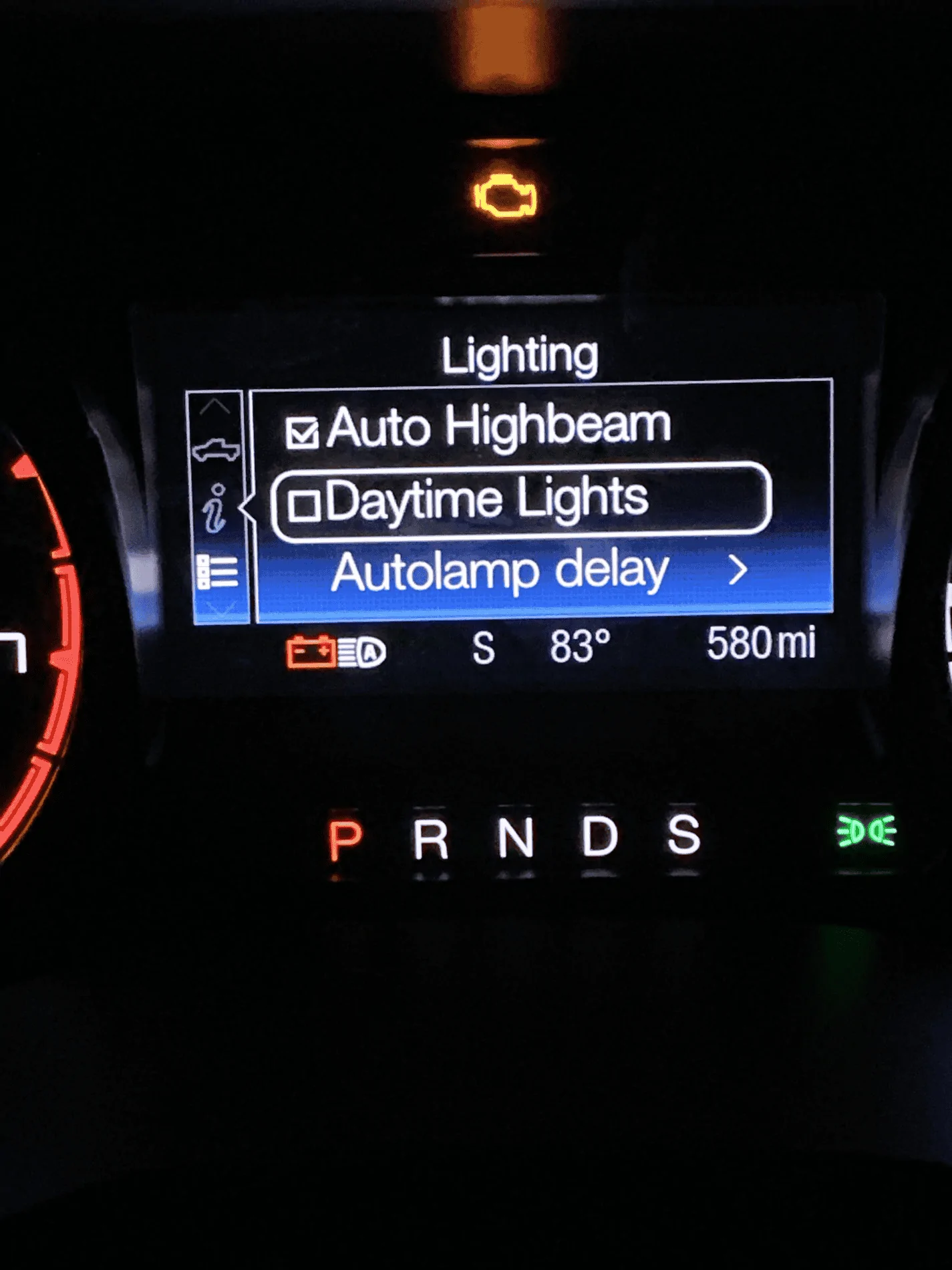
Do you have DRL selected in - IPC settings-(Daytime Lights)
And
Are you testing in full daylight?
 
Last edited:

veedubtuner

Well-Known Member
First Name
Morgan
Joined
Sep 8, 2021
Threads
80
Messages
1,257
Reaction score
5,495
Location
Tulsa, OK
Vehicle(s)
2004 VW R32/2023 CG XLT Scab FX4 Ranger
Occupation
VW Parts
Vehicle Showcase
1
Do you have DRL selected in - IPC settings-(Daytime Lights)
And
Are you testing in full daylight?
I don't know TBH, I just followed what you posted on the first page. Started in "allowed DRL" then went to "DRL" and then went into written to verify the "codes". I was in my garage with the lights on (bright LED's) if that make any difference.

I know the DRL's work per se, when I remote start the vehicle in the morning to let the truck warm up, they are on when I go in the garage, then turn off when I turn the key on. Everything else works fine, lights, brights, blinkers, no hyper flash or flicker. Just the DRL's don't come on while in drive. I'll check the IPC setting when I get home.
 
OP
OP
airline tech

airline tech

Well-Known Member
Joined
Aug 24, 2022
Threads
28
Messages
4,458
Reaction score
8,520
Location
Midwest - KS
Vehicle(s)
2022 Ranger Lariat-Super Crew, Cactus Gray
Occupation
Aircraft Tech
You are looking for a screen like this one: Make sure Daytime lights is selected, plus depending on how bright the garage is, they may not come on - that little clear bubble (sensor) on the center dash is the light sensor, it triggers the Headlights on, the sensor is very sensitive even a cloudy day will keep it from tripping DRL's on. if headlights are on, the DRL strip will be dim and when the headlights trip off, the DRL strip should be on Full Bright

Plus make sure Headlight switch is in - Auto, for DRL - Full Bright to Work

Borrowed Pic:

1678713615203.png
 

veedubtuner

Well-Known Member
First Name
Morgan
Joined
Sep 8, 2021
Threads
80
Messages
1,257
Reaction score
5,495
Location
Tulsa, OK
Vehicle(s)
2004 VW R32/2023 CG XLT Scab FX4 Ranger
Occupation
VW Parts
Vehicle Showcase
1
I don't use "auto" feature on the headlight switch, never have. I've always been the angry old man yelling at the clouds "I know how to turn on the headlights when needed" type of person lol. they should work if in the off position, just not as bright I assume?
 

IdahoRanger

Well-Known Member
First Name
Steve
Joined
Sep 26, 2019
Threads
12
Messages
4,329
Reaction score
21,512
Location
Idaho
Vehicle(s)
2019 Lariat SuperCrew FX4
Occupation
RETIRED
I don't use "auto" feature on the headlight switch, never have. I've always been the angry old man yelling at the clouds "I know how to turn on the headlights when needed" type of person lol. they should work if in the off position, just not as bright I assume?
Yay, I'm not the only one.
 

Big Blue

Well-Known Member
First Name
Lee
Joined
May 5, 2020
Threads
16
Messages
3,927
Reaction score
9,352
Location
Wisconsin
Vehicle(s)
2019 Ford Ranger XLT FX4 Supercrew lighting blue
Occupation
Retired mechanical designer
I don't use "auto" feature on the headlight switch, never have. I've always been the angry old man yelling at the clouds "I know how to turn on the headlights when needed" type of person lol. they should work if in the off position, just not as bright I assume?
That is your problem. DRLs only work in the Auto position. Only in Canada do the DRLs come on any time the vehicle is running. It's a law there. Far as I'm concerned should be here too.
 
OP
OP
airline tech

airline tech

Well-Known Member
Joined
Aug 24, 2022
Threads
28
Messages
4,458
Reaction score
8,520
Location
Midwest - KS
Vehicle(s)
2022 Ranger Lariat-Super Crew, Cactus Gray
Occupation
Aircraft Tech
You do have another option - To set the DRLs as to be on in any position except - Headlamp Position (Including Off) - It is known as Conventional DRL , US Trucks are set to Configurable DRL
Using Forscan - Easy Way - Set (DRL Conditions) to Option (A) I think, you only have 2 choices here (A or B), If I recall Option B is what US Trucks are set to, so change it to the other option.
But keep in mind that the Taillights will also be on - (I think) from other owners posting.
So, if you want DRL without Auto Position and make them on (Always) change this setting.
 

Attachments

lukdeg

Well-Known Member
First Name
Luc
Joined
May 16, 2022
Threads
6
Messages
248
Reaction score
593
Location
Edmundston
Vehicle(s)
Ford Ranger lariat 2023 Cactus grey
Occupation
paramedic
Anyone know if we could set the DRL to fog + led strip on Lariat?
canadian truck
Sponsored


Top