Sponsored

Just updated to Sync 3.4 on my Ranger 2019

younga01

Member
First Name
Adam
Joined
Apr 20, 2020
Threads
0
Messages
8
Reaction score
39
Location
West Texas
Website
instagram.com
Vehicle(s)
2019 Ford Ranger Lariat FX4, 2018 Ford Edge
Occupation
IT, Meteorology, and Basketball Coaching
Hi all! Long time lurker, figured I'd make my first post my update experience.
I downloaded it at about 1am last night, couldn't sleep, so figured why the hell not. Could NOT get my flash drive to work. Truck wouldn't recognize it. Didn't matter the format (exFAT, FAT, NFTS... quick format or full format... etc). Thing has worked in 50 servers, never an issue. Gave up, went to bed at about 330.

Went to re-download it this morning thinking maybe corrupted zip, got that message about trying again later. So screw it, I'll try last nights again. Actually grabbed a USB memory card adapter, and formatted a 16GB micro-SD to the reccomended exFAT and went to town. Fired right up in the truck.

Update took forever, much longer then any Sync3 update I've done in the wife's Fusion. Maybe the update, or maybe the slower read/write rate out of the SD card. But it went. I restarted 3 times over the course of 2 hours.

When done, everything has for the most part worked. I have climate (Lariat, FX4, Heated seats), Android Auto is great, and finally have song info on the dash.

The one thing that I feel is important, I have the rear camera image degradation that others have reported. For a comparison, it's like the equivalent of going from 1080p (HD) to 480 (Standard old, TV). Definitely still usable, but no longer crisp.

I also had to do a master reset to get FordPass and the truck talking again. Not a huge deal and gave me a chance to redo my Sirius lineup.

Love the new UI! Wish we had more backgrounds and colors to choose from. One can dream! It seemed slow for about 30-45 minutes after. Guessing some background processes still running, but after that it was quick and snappy.

Hope this helps someone! And shout out to @UofMEngineer. Being involved and helping us all out is something you don't have to do. Thanks for being the eyes on the inside.
Sponsored


 

Big Blue

Well-Known Member
First Name
Lee
Joined
May 5, 2020
Threads
16
Messages
3,927
Reaction score
9,352
Location
Wisconsin
Vehicle(s)
2019 Ford Ranger XLT FX4 Supercrew lighting blue
Occupation
Retired mechanical designer
Hi all! Long time lurker, figured I'd make my first post my update experience.
I downloaded it at about 1am last night, couldn't sleep, so figured why the hell not. Could NOT get my flash drive to work. Truck wouldn't recognize it. Didn't matter the format (exFAT, FAT, NFTS... quick format or full format... etc). Thing has worked in 50 servers, never an issue. Gave up, went to bed at about 330.

Went to re-download it this morning thinking maybe corrupted zip, got that message about trying again later. So screw it, I'll try last nights again. Actually grabbed a USB memory card adapter, and formatted a 16GB micro-SD to the reccomended exFAT and went to town. Fired right up in the truck.

Update took forever, much longer then any Sync3 update I've done in the wife's Fusion. Maybe the update, or maybe the slower read/write rate out of the SD card. But it went. I restarted 3 times over the course of 2 hours.

When done, everything has for the most part worked. I have climate (Lariat, FX4, Heated seats), Android Auto is great, and finally have song info on the dash.

The one thing that I feel is important, I have the rear camera image degradation that others have reported. For a comparison, it's like the equivalent of going from 1080p (HD) to 480 (Standard old, TV). Definitely still usable, but no longer crisp.

I also had to do a master reset to get FordPass and the truck talking again. Not a huge deal and gave me a chance to redo my Sirius lineup.

Love the new UI! Wish we had more backgrounds and colors to choose from. One can dream! It seemed slow for about 30-45 minutes after. Guessing some background processes still running, but after that it was quick and snappy.

Hope this helps someone! And shout out to @UofMEngineer. Being involved and helping us all out is something you don't have to do. Thanks for being the eyes on the inside.
OK, So I have to get up at 1:00 am to download a software update that I've been running for a month. Just so I can run it again to generate a file to send to Ford to let them know I did it. And hope it doesn't mess up my system that I need to go into Forscan to fix it. Because the dealer doesn't know anything about the update. WTF! On top of that they release an update for year old maps that requires a SYNC update they had not released yet to work properly. And when it doesn't work they'll sell you a $5 jump drive for $40.

Man, does Ford sick at updates or what. Glad I don't have NAV at least I missed out on that fiasco.
 

Big Blue

Well-Known Member
First Name
Lee
Joined
May 5, 2020
Threads
16
Messages
3,927
Reaction score
9,352
Location
Wisconsin
Vehicle(s)
2019 Ford Ranger XLT FX4 Supercrew lighting blue
Occupation
Retired mechanical designer

Big Blue

Well-Known Member
First Name
Lee
Joined
May 5, 2020
Threads
16
Messages
3,927
Reaction score
9,352
Location
Wisconsin
Vehicle(s)
2019 Ford Ranger XLT FX4 Supercrew lighting blue
Occupation
Retired mechanical designer
The one thing that I feel is important, I have the rear camera image degradation that others have reported. For a comparison, it's like the equivalent of going from 1080p (HD) to 480 (Standard old, TV). Definitely still usable, but no longer crisp.
Is this for real? How many other people have noticed this, I've seen it posted a couple of times now. Is this another settings screw up like losing the climate screen. Can it be fixed with a Forscan setting? I mean, they didn't change the camera or screen, why the resolution change?
 

Geoff

Well-Known Member
Joined
Oct 17, 2018
Threads
5
Messages
705
Reaction score
497
Location
NYS
Vehicle(s)
'19 Ranger 1943 Willys Jeep
Occupation
Retired Engineer


CoastieN70

Well-Known Member
First Name
Lee
Joined
May 31, 2019
Threads
10
Messages
410
Reaction score
628
Location
Travelers Rest, SC
Vehicle(s)
2019 Ranger Lariet
Occupation
Retired
Is this for real? How many other people have noticed this, I've seen it posted a couple of times now. Is this another settings screw up like losing the climate screen. Can it be fixed with a Forscan setting? I mean, they didn't change the camera or screen, why the resolution change?
My camera is the same as always since the updates...
 

JetEngr19

Well-Known Member
Joined
Jan 12, 2019
Threads
4
Messages
145
Reaction score
213
Location
Oklahoma City
Vehicle(s)
2019 Ford Ranger, 2016 Jeep Wranger
Is this for real? How many other people have noticed this, I've seen it posted a couple of times now. Is this another settings screw up like losing the climate screen. Can it be fixed with a Forscan setting? I mean, they didn't change the camera or screen, why the resolution change?
My camera resolution hasn’t changed.
 

VegasP11

Well-Known Member
First Name
Ian
Joined
Dec 20, 2019
Threads
5
Messages
241
Reaction score
717
Location
Kansas
Vehicle(s)
2019 Lariat FX4
I haven't noticed any change in the camera either.
 

Murphie

Well-Known Member
First Name
Jim
Joined
Oct 18, 2018
Threads
3
Messages
331
Reaction score
572
Location
Lindale TX
Vehicle(s)
2019 Ranger Lariat 4X2, 2023 Hyundai Santa Fe
Occupation
Financial Auditor - Retired
In addition to the issues already mentioned, I believe that there's one with audio.

I use a USB drive for audiobooks. I believe there's an issue with Sync now recognizing the USB, or at very least is slow to recognize it's there; so Sync defaults to AM radio as the source. Luckily, all I have to do is select Source, find my USB, and the book continues where it left off. I do not ever remember having this issue with Sync 3.3.

https://www.ranger5g.com/forum/threads/apple-carplay-is-infuriating.8450/post-155006
 

Gizmokid2005

Well-Known Member
Joined
Dec 1, 2019
Threads
13
Messages
1,279
Reaction score
1,875
Location
GA
Website
gizmokid2005.com
Vehicle(s)
2019 Ford Ranger XLT 4X4 SCrew
Occupation
SQL Developer
Vehicle Showcase
1
For those with the camera issues, have you touched the plus sign in the upper left when the backup camera is on? I don't recall if it was there previously, but if you tap it, it turns into a minus sign button and zooms in the camera.

I suspect this may be the case, the resolution drops significantly when it's zoomed in.
 

younga01

Member
First Name
Adam
Joined
Apr 20, 2020
Threads
0
Messages
8
Reaction score
39
Location
West Texas
Website
instagram.com
Vehicle(s)
2019 Ford Ranger Lariat FX4, 2018 Ford Edge
Occupation
IT, Meteorology, and Basketball Coaching
For those with the camera issues, have you touched the plus sign in the upper left when the backup camera is on? I don't recall if it was there previously, but if you tap it, it turns into a minus sign button and zooms in the camera.

I suspect this may be the case, the resolution drops significantly when it's zoomed in.
Good question. I don't recall that being there last night or before the update, but I'll certainly give it a try when I jump in the truck later on tonight. It seemed like the viewing angle is the same, what you would expect with a fish eye style lens.

I'll give it a try after jumping in the truck and report back.
 

Rp930

Well-Known Member
First Name
Rick
Joined
Nov 19, 2018
Threads
20
Messages
1,794
Reaction score
3,514
Location
Denver
Vehicle(s)
‘19 Ford Ranger Lariat, ‘23 Macan,’21 Shelby GT500
Occupation
Retired
Finally got 119 to load and show up in 3.4. I did a slow format on my USB stick re downloaded. About 45 minutes.

My resolution looks normal. I did change the Wallpaper to the diamond like pattern which looks slightly darker to me.
 

Gizmokid2005

Well-Known Member
Joined
Dec 1, 2019
Threads
13
Messages
1,279
Reaction score
1,875
Location
GA
Website
gizmokid2005.com
Vehicle(s)
2019 Ford Ranger XLT 4X4 SCrew
Occupation
SQL Developer
Vehicle Showcase
1
For those with the camera issues, have you touched the plus sign in the upper left when the backup camera is on? I don't recall if it was there previously, but if you tap it, it turns into a minus sign button and zooms in the camera.

I suspect this may be the case, the resolution drops significantly when it's zoomed in.
Good question. I don't recall that being there last night or before the update, but I'll certainly give it a try when I jump in the truck later on tonight. It seemed like the viewing angle is the same, what you would expect with a fish eye style lens.

I'll give it a try after jumping in the truck and report back.
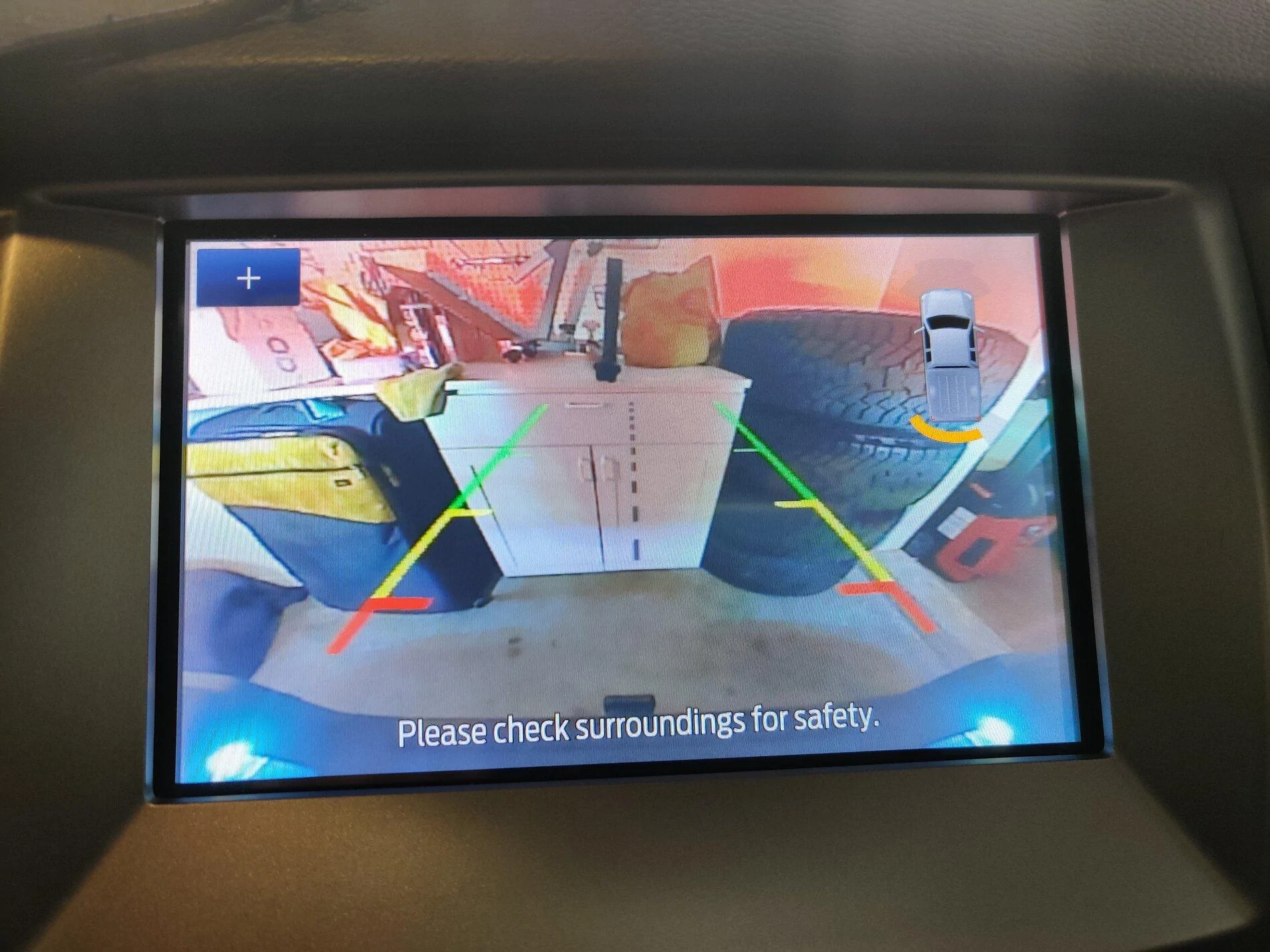
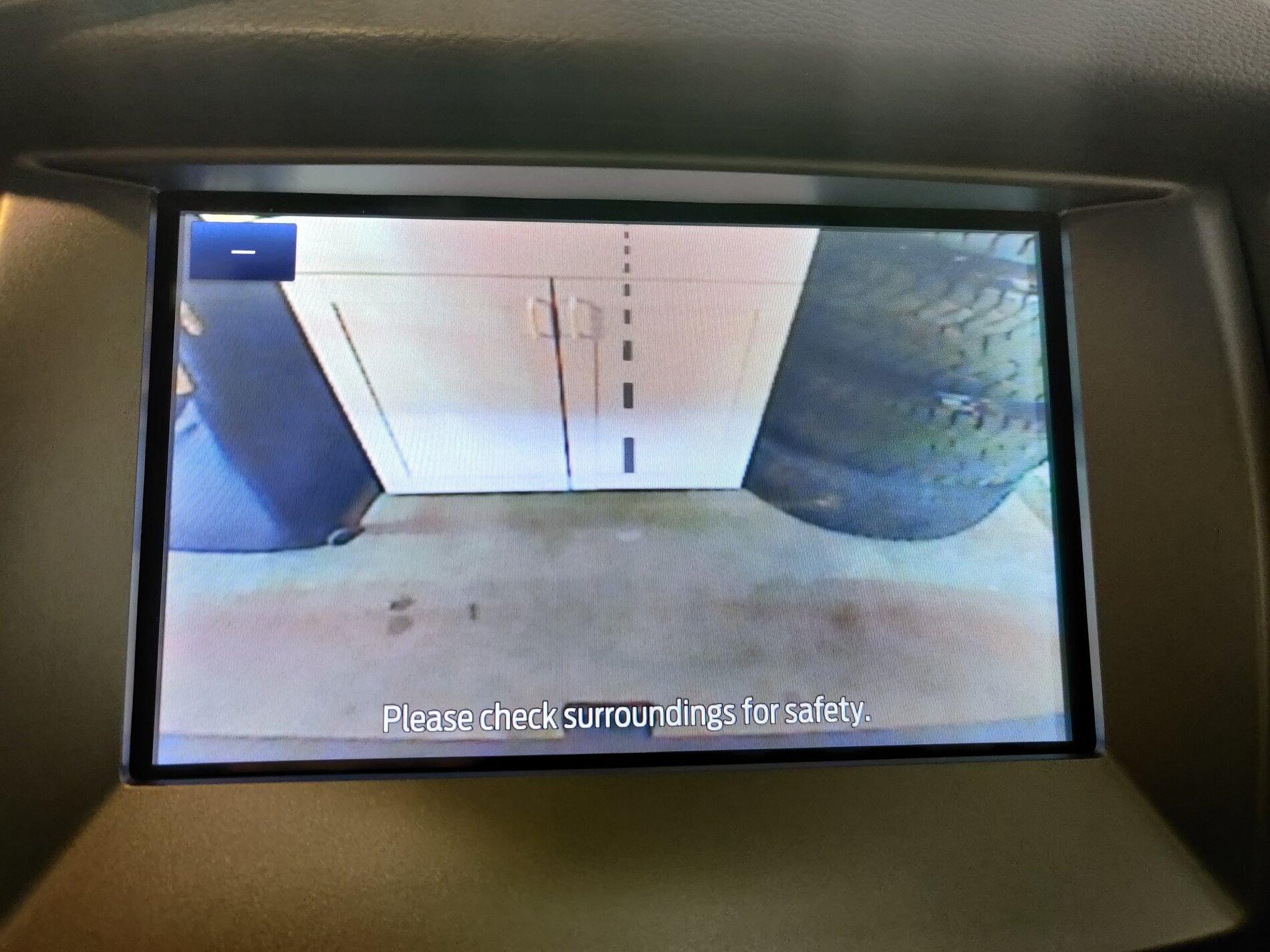
Here's what I mean. Though it looks a bit smoother on camera than in person, the difference is noticeable.

"Regular" version:
2020-08-01 11.36.31.webp


Zoomed version:
2020-08-01 11.36.27.jpg
 

TylerV76

Well-Known Member
First Name
Tyler
Joined
Dec 5, 2019
Threads
4
Messages
306
Reaction score
395
Location
Oxford, Michigan
Vehicle(s)
2019 Ranger FX4
Occupation
Emissions testing supplier
For those with the camera issues, have you touched the plus sign in the upper left when the backup camera is on? I don't recall if it was there previously, but if you tap it, it turns into a minus sign button and zooms in the camera.

I suspect this may be the case, the resolution drops significantly when it's zoomed in.
that dras
Here's what I mean. Though it looks a bit smoother on camera than in person, the difference is noticeable.

"Regular" version:
2020-08-01 11.36.31.jpg


Zoomed version:
2020-08-01 11.36.27.jpg
The regular view definitely lost some clarity. I noticed it last month immediately after installing 3.4. Its got a bit more grainy look to it. Compared to our other vehicles, its definitely not as sharp. Nothing for me to care about but I can see it.
 

BoC

Member
First Name
Bo
Joined
Jul 14, 2020
Threads
4
Messages
17
Reaction score
7
Location
Spokane, WA
Vehicle(s)
2019 Ford Ranger
Occupation
Physician Assistant
Vehicle Showcase
1


Top